Tool guide
Bet stream guide
The latest matched bets on SharkBetX, Exchange and Classic, with the markets that are busiest right now. Keep the stream open in another tab and go straight to what you want to know.
The full stream comes with any Sharkbetting account, free or Pro.
Quick start
From opening the page to the market you want to lay, in four steps.
- Open the Bet streamIn the hub menu, under Match & market. It fills itself and refreshes every 30 seconds.Show me how
- Pick a venueAll, Exchange or Classic at the top right. Add a Min stake to hide small bets.Show me how
- Read the two rankingsMost Active counts bets in the last hour. Highest Volume adds up their stakes.Show me how
- Open the event before you laySearch the match in Match View or the Oddsmatcher and check the price you can get now.Show me how
- Wondering if a row is your bet? What the stream knows about you.
- A table is empty? What each message means.
The Bet stream at a glance
Where: Hub menu, Match & market, Bet stream
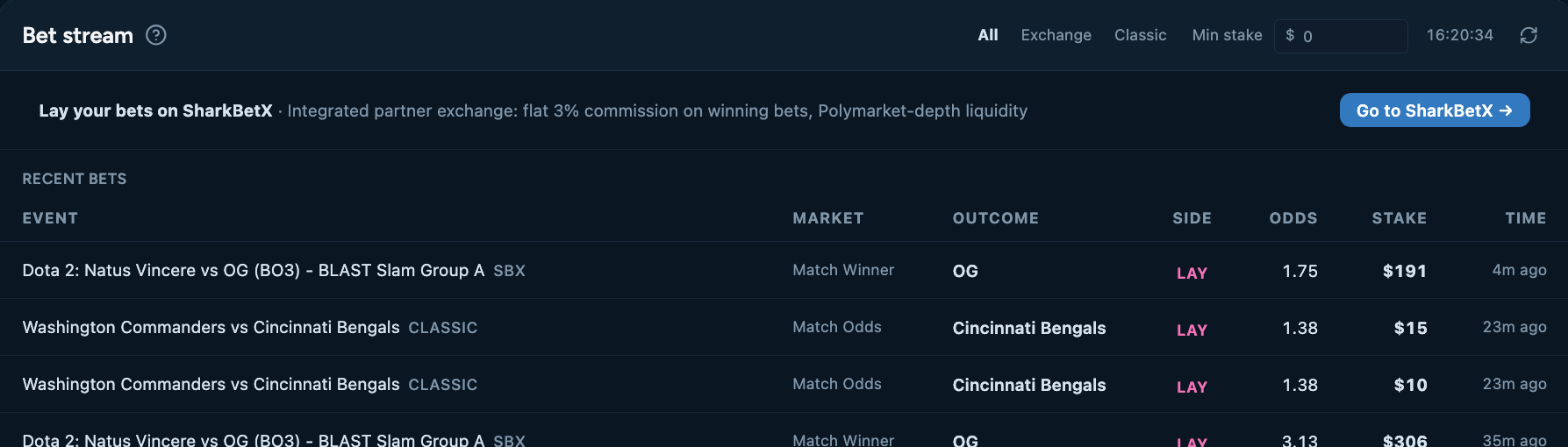
The menu and the page call it Bet stream. It is one frame with a header row, a SharkBetX line and three tables.
- Header row
- The venue buttons All, Exchange and Classic, the Min stake box, the time of the last update and the Refresh button.
- SharkBetX line
- Lay your bets on SharkBetX with a Go to SharkBetX button. It is the same on every visit and does not change with the filters.
- Recent Bets
- The newest single bets, one per row.
- Most Active · Last Hour
- Markets ranked by how many bets they took in the last hour.
- Highest Volume
- Markets ranked by the stake their bets add up to.
Where the bets come from
Every row is a SharkBetX bet: a fill on the Exchange or a bet on Classic. Bets at bookmakers, at Betfair or in your Bet Tracker are never in the stream.
The ? next to the title has a one-line description and a link back to this guide.
Read Recent Bets
Where: Bet stream, the first table
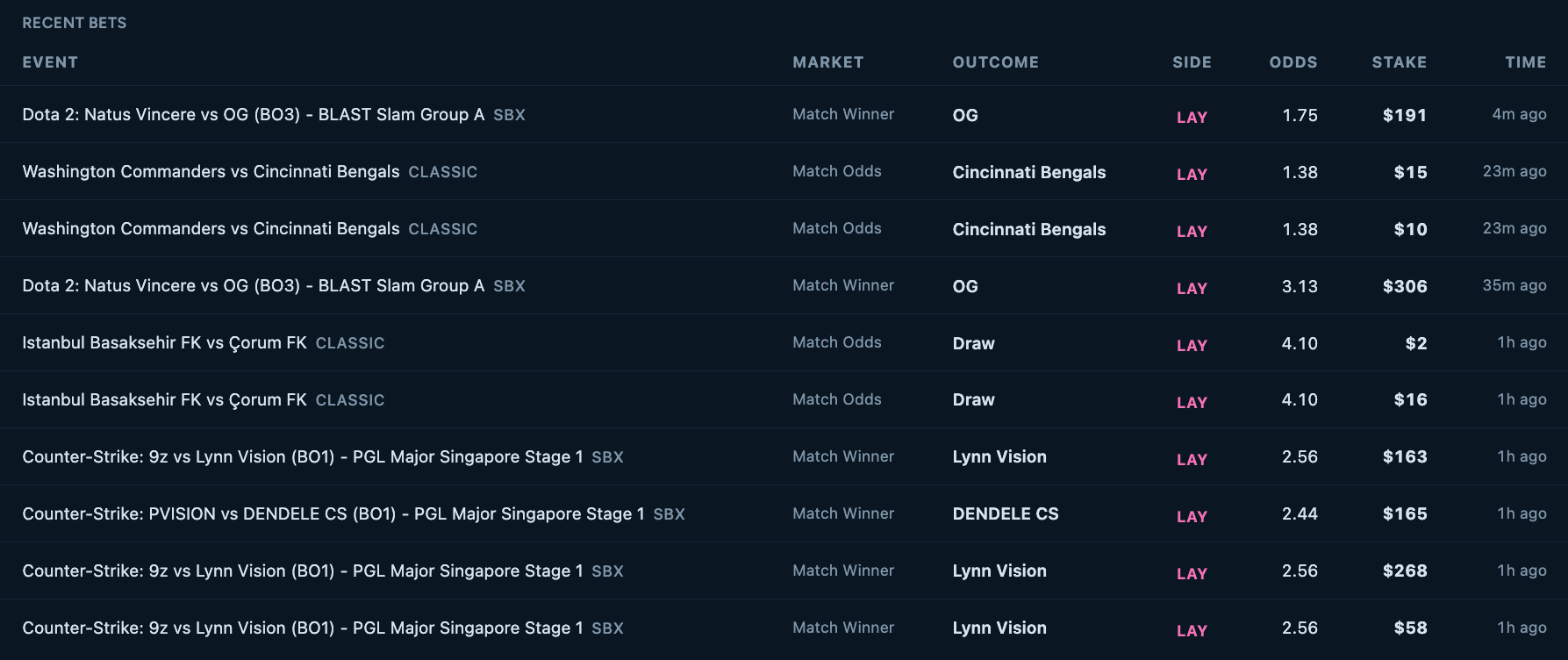
One row is one matched bet. It shows the 10 newest bets that pass your filters, newest first.
- Event
- The match. After it, SBX marks a SharkBetX Exchange bet and CLASSIC an SBX Classic bet.
- Market
- For example Match Winner, Over/Under or Both Teams to Score. Classic names the match result Match Odds.
- Outcome
- The selection that was backed or laid.
- Side
- Back in blue or Lay in pink. A lay is a bet against the outcome in the row.
- Odds
- The decimal odds the bet was matched at, to two decimals.
- Stake
- The backer's stake in dollars, rounded to a whole dollar. On a lay this is the stake laid, not the layer's liability.
- Time
- When the bet was matched: Just now, then minutes, hours or days ago.
Which bets are left out
- Bets with a stake under $1.
- Orders that are not matched yet. An Exchange bet shows once its fill is confirmed.
- SharkBetX's own accounts.
A Classic bet that was matched in parts can show as more than one row.
Read Most Active and Highest Volume
Where: Bet stream, the second and third table
Both tables group the bets by event and market and show the top 10. One row is one market, with every bet on it from every member together.
One match, two rows
Rows are grouped by the event and market names each venue uses, and the two venues name them differently. A match bet on both venues can show twice. Neither row is the total.
For example Bengals vs. Commanders (SBX) and Washington Commanders vs Cincinnati Bengals (CLASSIC) are the same match.
- Most Active · Last Hour
- Bets is how many bets the market took in the last 60 minutes. Markets with none in that hour are left out.
- Highest Volume
- Stake is the stakes of its bets added up, in dollars. Point at the number to see how many bets it is.
- Latest
- The newest bet on that market: outcome, side, odds and stake.
Good to know
The rankings are built from the latest bets the stream holds, not from a whole day. Highest Volume has no time limit of its own: on a quiet day it can still list bets from hours ago.
Click a row to open its outcomes: see step 1 of From a busy market to the event.
How many bets the rankings look at
Without a Min stake, the latest 100 bets of both venues together. With one, up to the latest 100 of each venue. The two rankings can change a little when you set or clear a Min stake.
An open row stays open by its place in the list. If the order changes at a refresh, that place can hold a different market: check the event name.
Filter by venue and stake
Where: Bet stream, the header row
Pick a venue
Click All, Exchange or Classic. The one in bold is on. It applies to all three tables.
Good to know
A ranking row can hold bets from both venues. Exchange and Classic keep the rows whose latest bet is on that venue, and their numbers still count both.
Set a Min stake, if you want
Type a dollar amount in Min stake. Recent Bets then shows only bets of at least that stake. Clear the box to see every bet again.
It filters Recent Bets only. The two rankings always count every bet.
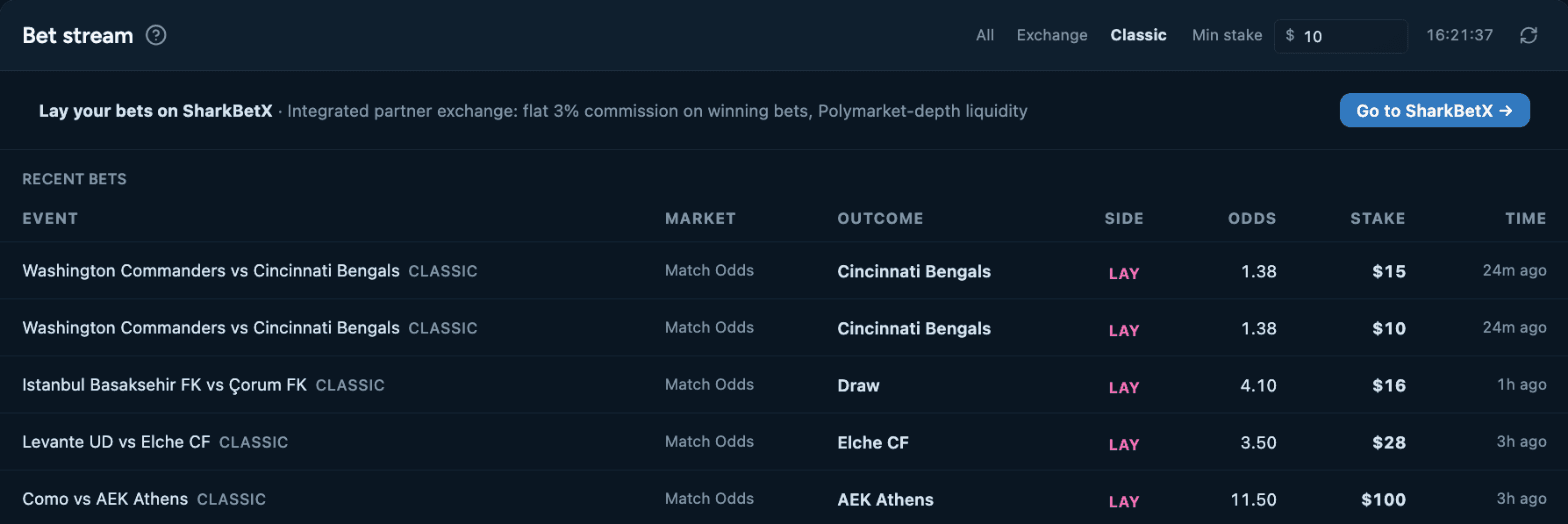
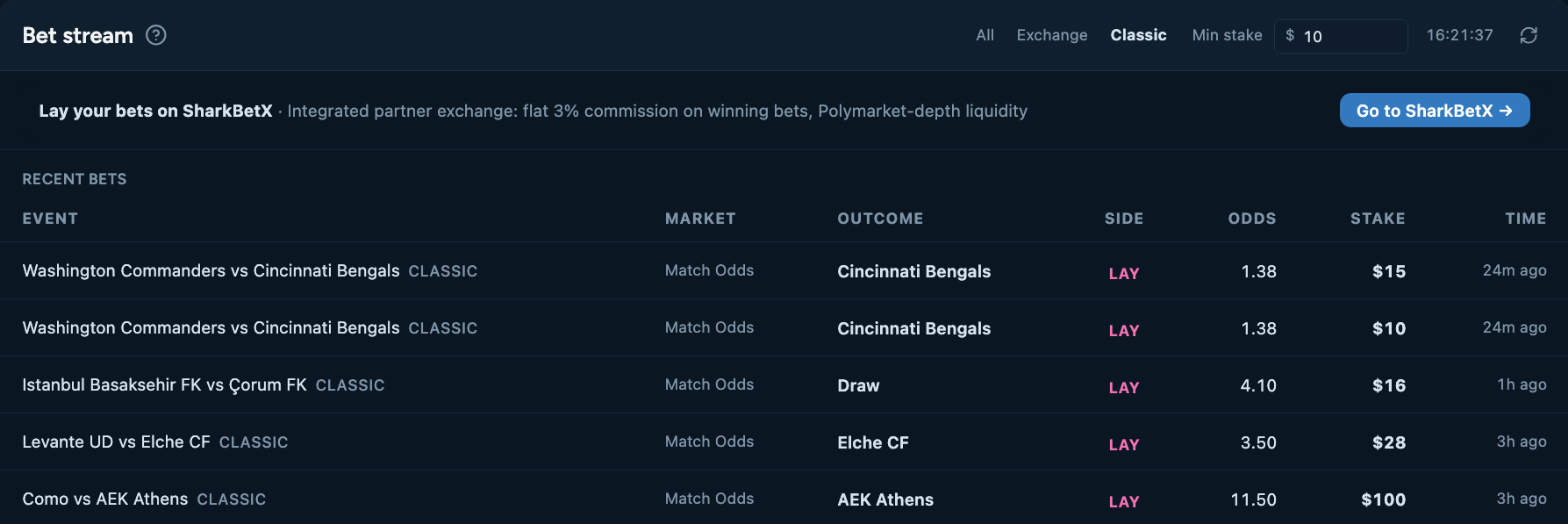
Classic with a Min stake of 10: five Classic bets of 10 dollars or more, reaching back about three hours. Swipe sideways to see all of it, or tap to open it.
Kept for next time, and shareable
Your venue and Min stake are kept in this browser and come back on your next visit. They are not saved to your account, so another device starts on All with no minimum.
They are also in the page address (for example ?venue=classic&min=50). A link with them opens the stream with those filters, whatever this browser had saved.
From a busy market to the event
Where: Bet stream, then Match View or the Oddsmatcher
A market near the top of both rankings is one where bets are being matched on SharkBetX right now. The stream does not show the odds or the stake still on offer, so check them before you lay.
Note the event and the market
Click a row in Most Active · Last Hour or Highest Volume to open All Outcomes: each outcome with the stake on it and the odds of its latest bet.
You can open several rows at once. Click a row again to close it.
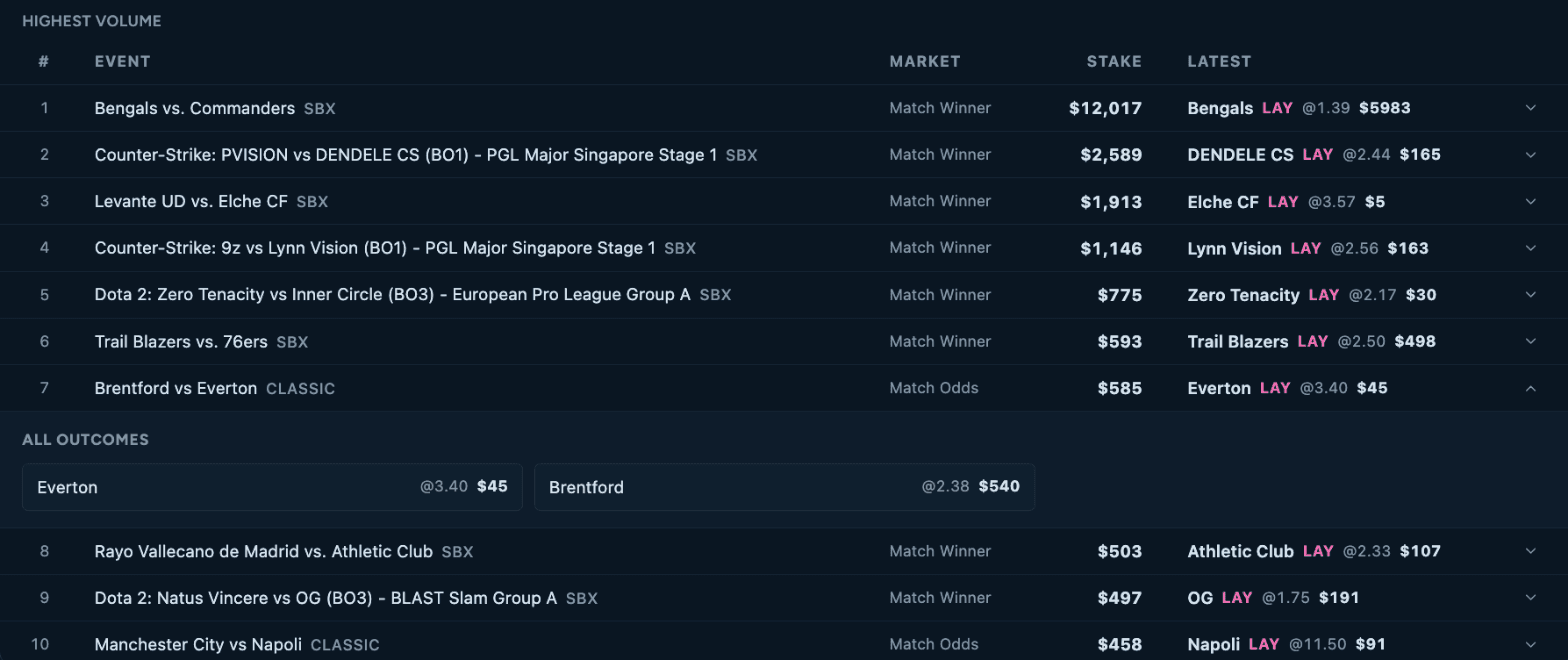
Brentford vs Everton opened in Highest Volume: 540 dollars on Brentford, 45 on Everton. Swipe sideways to see all of it, or tap to open it. Good to know
The stake per outcome counts back and lay bets together. Use Latest or Recent Bets to see which side was bet.
Find the event in another tool
Rows in the stream are not links. Type a team from the row in Search team or league in Match View or the Oddsmatcher.
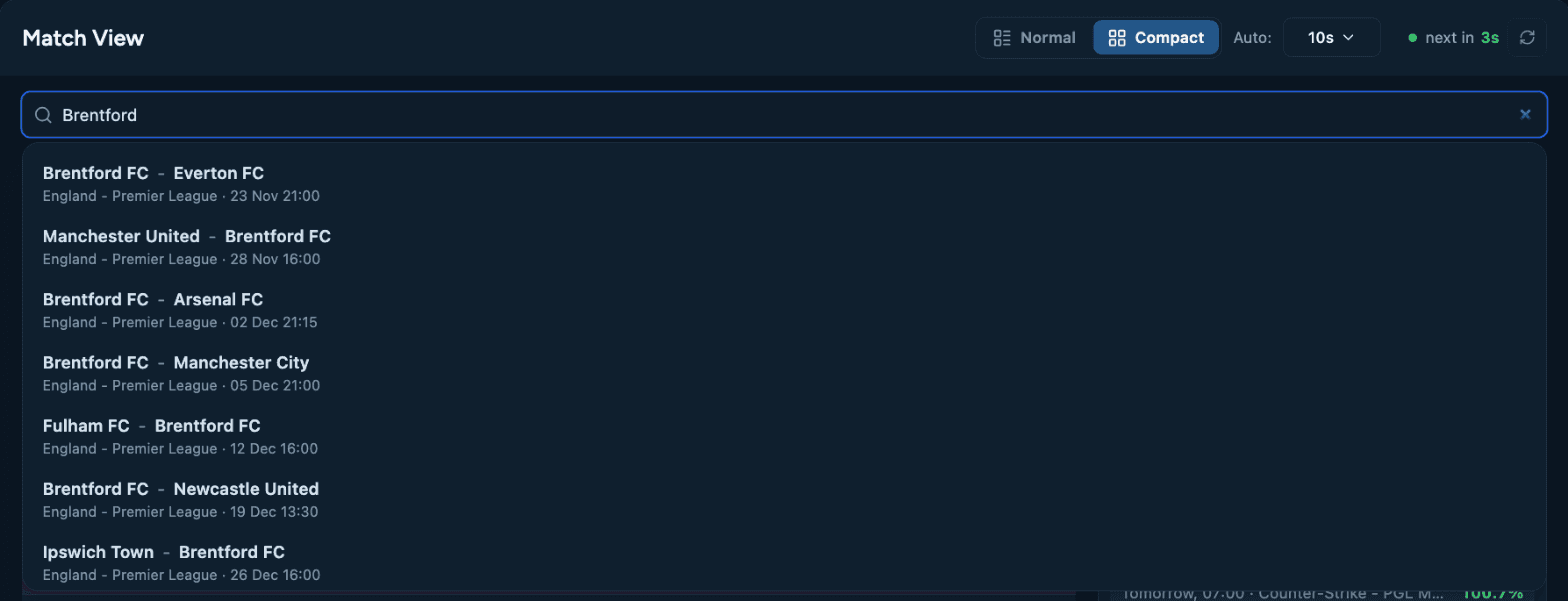
Brentford typed in Match View: the match from the stream is the first result. Swipe sideways to see all of it, or tap to open it. Check the price you can get now, then lay
Match View compares the prices for that match across bookmakers and exchanges. The Oddsmatcher pairs a back bet with a lay and works out the lay stake.
How to read them: Match View guide and Oddsmatcher guide.
New to laying on SharkBetX? Start with the SharkBetX guide. After you lay, the bet logs itself in the Bet Tracker.
Whose bets these are
- Who is in it
- Every SharkBetX customer whose bet is matched, on the Exchange or on Classic. That includes you when you bet on SharkBetX.
- What it shows
- Event, market, outcome, side, odds, stake and time. No name, account, wallet address or bet number reaches the stream.
- Is this my bet?
- The stream cannot tell, and it does not mark your own bets. A row with your event, odds, stake and time is probably yours, but another member can place the same bet.
- Who can see it
- Anyone signed in to Sharkbetting sees every row. The front page also shows the latest 10 bets to every visitor, signed in or not. They all see the bet, never who placed it.
Your own SharkBetX bets, with their results, are on the Exchanges tab of the Bet Tracker once your wallet is linked.
Refresh and timing
- The page fetches the stream again every 30 seconds while its tab is in front.
- In a tab in the background it waits. Click Refresh to fetch at once.
- The time in the header row is when the shown data was fetched, in your own time zone.
- The Time column is worked out at that fetch. It does not count up between refreshes.
How long before a new bet shows
SharkBetX updates its feed at most every 10 seconds. Add the page's 30 seconds, and a bet usually shows within about 40 seconds of being matched.
An Exchange bet can take longer, because it shows only once its fill is confirmed.
Plans and the signed-out preview
- Free and Pro
- The same stream, with every table, filter and number. Nothing in it is held back for Pro.
- Signed out
- A preview under Bet Stream Preview: 5 recent bets, the top 3 of each ranking, and no Min stake box. Stakes, ranking markets and the latest odds are locked. It refreshes every 60 seconds. The preview is a site setting: if it is off, you are asked to sign in.
A free account opens the full stream: see the plans.
On a phone
The same three tables, with fewer columns so nothing scrolls sideways.
- Recent Bets: the market sits under the event and the side under the outcome. The Time column is hidden.
- The rankings: the market and the latest bet sit under the event. Tap a row to open All Outcomes.
- The venue buttons, Min stake and Refresh wrap onto a second line under the title.
When it shows nothing or looks wrong
- No bets in the last hour.
- Nothing was matched on SharkBetX in the last 60 minutes. Highest Volume can still list older bets.
- No bets on this venue in the last hour.
- The same, for the venue you picked. Try All.
- No bets in the stream yet.
- The stream has no bets to show, or SharkBetX did not answer. Wait for the next refresh.
- No bets on this venue yet.
- None of the latest bets is on that venue. Try All.
- Recent Bets is empty
- It has no message of its own. Your Min stake is likely higher than any recent bet, or the venue has none: clear the box or pick All.
- The time does not move
- The tab was in the background. Click Refresh.
One venue missing
Exchange and Classic come from two feeds. When one does not answer, the other still shows, and the page does not say so. If Classic or Exchange stays empty while the other is busy, try again in a minute.
Something in the Bet stream does not match this guide? Tell us on the help page.