Tool guide
Oddsmatcher guide
The Oddsmatcher lists bets you can back at a bookmaker and lay on an exchange, with what each one costs you. Keep it open in another tab and go straight to the task you are on.
It comes with a free Sharkbetting account. Pro refreshes faster and takes more bookmakers: see what each plan gets.
Quick start
From an open Oddsmatcher to one placed and logged matched bet.
- Find a row you can betPick your bookmaker under + Bookmaker. The list is sorted by Rating: the top rows lose the least.Show me how
- Work out the layOpen the calculator on the row, choose Qualifying, type your stake and read Required lay.Show me how
- Place both betsClick the odds to back at the bookmaker, then click the lay price to lay on the exchange.Show me how
- Log itLog to tracker under the calculator books the bet in your Bet Tracker.Show me how
- New to matched betting? The matched betting guide explains why a back and a lay together cover every result.
- Betting a free bet? Use the SNR or SR tab and sort by FB Rating.
- Want a ping instead of watching the list? Set an alert.
The Oddsmatcher at a glance
In the hub menu and at the top of the page it is called Oddsmatcher. It has four areas, from the top down.
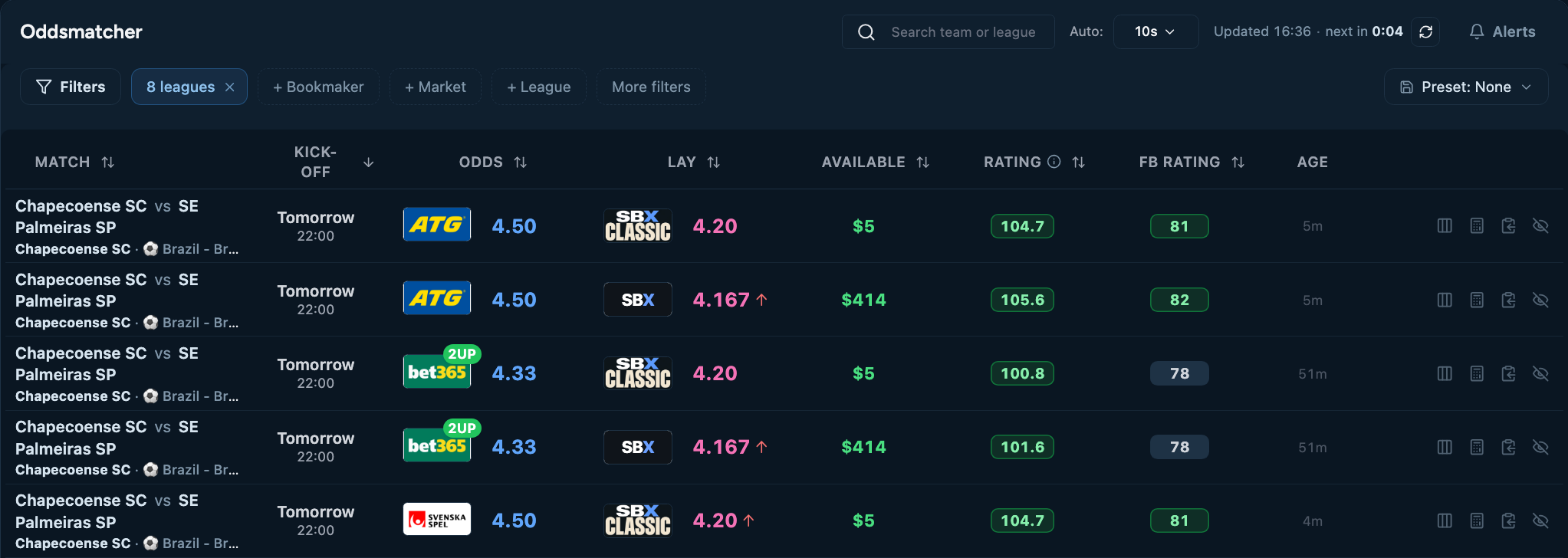
- Header
- The search box, Auto: (how often the list refreshes), when it last updated, the refresh button and Alerts.
- Filter row
- Filters, a chip for each filter in force, + Bookmaker, + Market, + League, More filters and your saved Preset.
- Filter panel
- Opens under Filters: exchanges, commission, layout, and the cards Preferences, Bookmakers and Leagues.
- The list
- One row per bet: one selection at one bookmaker, against the lay price at one exchange. Under it you pick how many rows a page shows.
Two things it does not show
Only matches that have not started. A row leaves the list at kick-off; for in-play odds use Live Odds.
Value bets. Since September they have their own tool, the Value matcher: see the Value matcher guide.
Read a row
Rows are sorted by Rating, highest first. Click a column name to sort by it; click again to turn the order around.

- Match
- The teams, the selection you back in bold, and the league.
- Kick-off
- Today, Tomorrow or the date, and the time on your own clock.
- Odds
- The bookmaker's logo and its back price. Click it to open the bookmaker in a new tab. On hover a small arrow opens that market at the bookmaker, when we have the link.
- Lay
- The exchange's logo and its lay price. Click it to open the exchange.
- Available
- How much you can lay at that price right now: in € for Betfair Exchange, in $ for SharkBetX and SBX Classic.
- Rating
- The share of your stake you keep after laying, commission included. How it works.
- FB Rating
- Roughly the share of a free bet (stake not returned) you turn into cash. Green from 80.
- Age
- How long ago the bookmaker price last changed. Why it matters.
- The icons
- Open in Match View, Open calculator, Copy match name and Hide this match for me.
Good to know
The same bet can show twice, once per exchange you have switched on. Each row is priced against its own exchange.
A price that changed shows a small arrow for a moment: up or down. A 2UP tag on a bookmaker logo marks that bookmaker's 2UP offer.
The Match View icon opens the match with every bookmaker's match result price side by side: see the Match View guide.
Hover for the price times
Hover a logo or a price: Price changed: is when that price last moved, Page refreshed: is when your list last loaded.
How the Rating works
The Rating is what you keep of your stake when you back and lay at the balanced lay stake, after the exchange's commission. 100 is break-even. Above 100 you make a small profit whatever the result.
- Formula
- 100 × back odds × (1 − commission) / (lay odds − commission), commission as a fraction.
- Example
- Back 2.50, lay 2.60, SharkBetX at 3%: Rating 94.4. On a 10 stake you lose about 0.56 whatever happens.
- Colours
- Light green from 97, bright green from 100.
Good to know
The commission is your own rate for that exchange while Adj. commission is on. Turn it off and the Rating is simply 100 × back / lay. Set your rates.
FB Rating and free bets
FB Rating rates a row for a free bet where the stake is not returned. A high back price helps here, so a row with a low Rating can still be a good free bet row.
It is an estimate. The SNR tab of the calculator gives the exact amount for your free bet. The column shows only on wide screens.
The info button next to Rating
The small (i) after the column name gives the same definition in one line. On a touch screen, tap it.
Filter the list
Where: The filter row and the filter panel
Every filter applies at once and shows as a chip in the filter row. Click a chip to remove that filter, or Clear all to remove them all.
Search
Type in Search team or league. It searches team names, match names and leagues inside your other filters.
Bookmakers and leagues
Click + Bookmaker or + League
The panel opens with the menu. Search, then tick what you want. Nothing ticked means all of them.
Close the menu
The list reloads when the menu closes, not on every tick. Clear in the menu unticks everything.
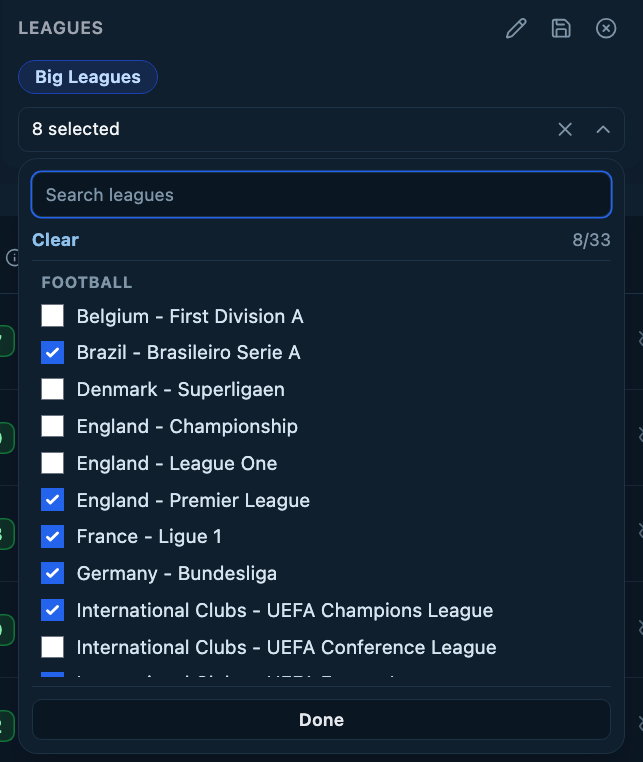
Good to know
Leagues are grouped under their sport. On your first visit a league preset called Big Leagues is made for you and switched on. Presets.
The bookmaker menu lists the bookmakers switched on for your account. To add one, see your bookmakers.
Time window and minimum Rating
Both sit in the Preferences card of the panel.
- Time
- Kick-offs from now to the end of Today, or up to 30 days ahead. It starts on 30 days.
- Min rating
- From 90+ to 102+. It starts on 98+. Rows above 120 are left out: that is almost always a wrong price.
More filters: odds, liquidity and markets
Click More in the Preferences card. A panel opens.
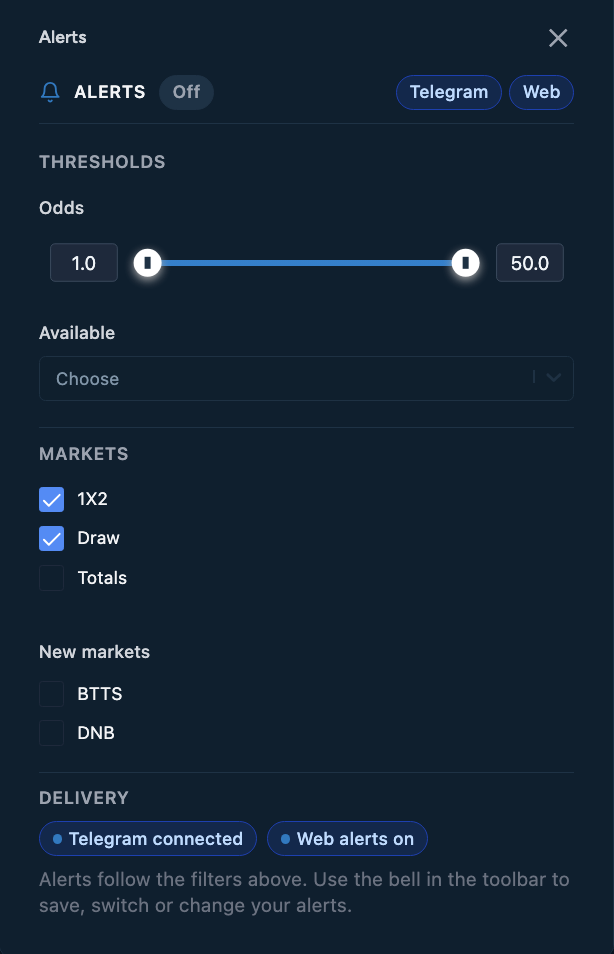
- Odds
- A slider for the back price, from 1 to 50.
- Available
- Only rows where at least that much can be laid, for example €100+.
- Markets
- 1X2 (with Draw on or off), Totals, and under New markets BTTS and DNB.
Good to know
The panel is headed Alerts because your alert follows these same filters. Alerts.
+ Market and More filters in the filter row open the filter panel; the market boxes are behind More there.
Start again
Each card has Reset to show all (the circled cross). On Preferences it puts time, rating, odds, liquidity and markets back to where they start.
Choose the exchange and your commission
Where: The filter panel, top row
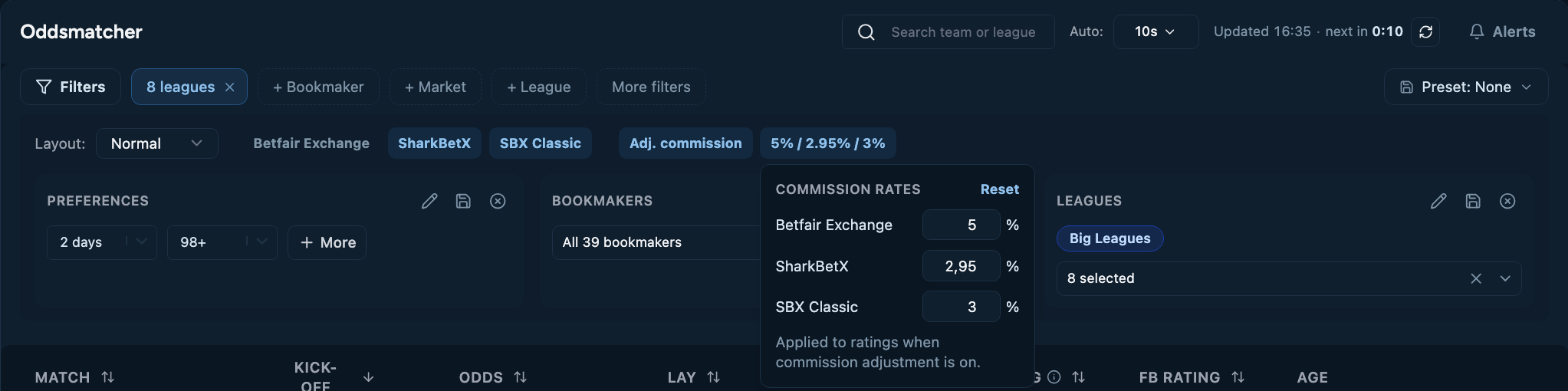
Exchanges
Click Betfair Exchange, SharkBetX or SBX Classic to show or hide the rows laid there. At least one stays on, and your choice is saved to your account.
Which markets each exchange prices
SharkBetX: 1X2, Over/Under 2.5 and BTTS. SBX Classic: 1X2. Betfair Exchange: all of them.
New to SharkBetX? The SharkBetX guide explains the exchange.
Commission
Keep Adj. commission on
With Adj. commission on, the Rating counts what the exchange takes from a winning lay. It is on each time you open the page.
Set your own rates
Click the percentages next to it. Under Commission rates type your rate per exchange, from 0 to 20 in steps of 0.5.
They start at Betfair 5%, SharkBetX 3% and SBX Classic 3%. Reset puts them back.
Good to know
Your rates are saved to your account and are also the calculator's starting COMMISSION (%). If your Betfair rate is not the standard one, the Betfair expert fee guide explains why.
Save your filters as presets
Where: The filter panel, the three cards
A preset is a named set of filters. There are three kinds, one per card.
- Preferences
- Time, minimum rating, odds, liquidity and markets.
- Bookmakers
- The bookmakers you ticked.
- Leagues
- The leagues you ticked.
Set the filters you want to keep
A bookmaker or league preset needs at least one ticked; until then its save button is greyed out.
Click the save icon on that card
Type a Name and click Save. The preset shows as a chip in the card.
Apply it later with one click
Click the chip. One preset of each kind can be on at a time. Click it again to go back to the filters you had before.
Preferences presets are also in the Preset menu at the right of the filter row.
Rename, reorder, delete
Click the pencil (Edit names) on the card, then click a chip to rename it. The ✕ next to it deletes it after you confirm. Drag chips to change their order.
Share your filters
The address in your browser carries the filters you changed. Copy it and send it; the person who opens it sees the same filters.
Work out the lay
Where: The calculator icon on a row (on a phone, tap the row)
Open the calculator
The Calculator window opens with the back and lay price of that row. They are copied once: if a price moves later, type the new one.
Choose the bet type
- Qualifying
- A bet with your own money, usually to unlock an offer.
- SNR
- A free bet where the stake is not returned with the winnings.
- SR
- A free bet where the stake is returned.
Type your stake
Type it under STAKE and pick its currency (EUR, USD or NOK).
Check the prices and the commission
BACK ODDS (DECIMAL) and LAY ODDS (DECIMAL) should match the two sites. COMMISSION (%) starts at your rate for that exchange.
BET RATING is the row's Rating at these numbers.
Read the lay stake
REQUIRED LAY: is what you lay on the exchange. The copy button next to it puts it on your clipboard; the currency menu next to it converts it.
The table shows the result IF BACK WINS and IF LAY WINS, at the BOOKMAKER, at the EXCHANGE and in TOTAL.
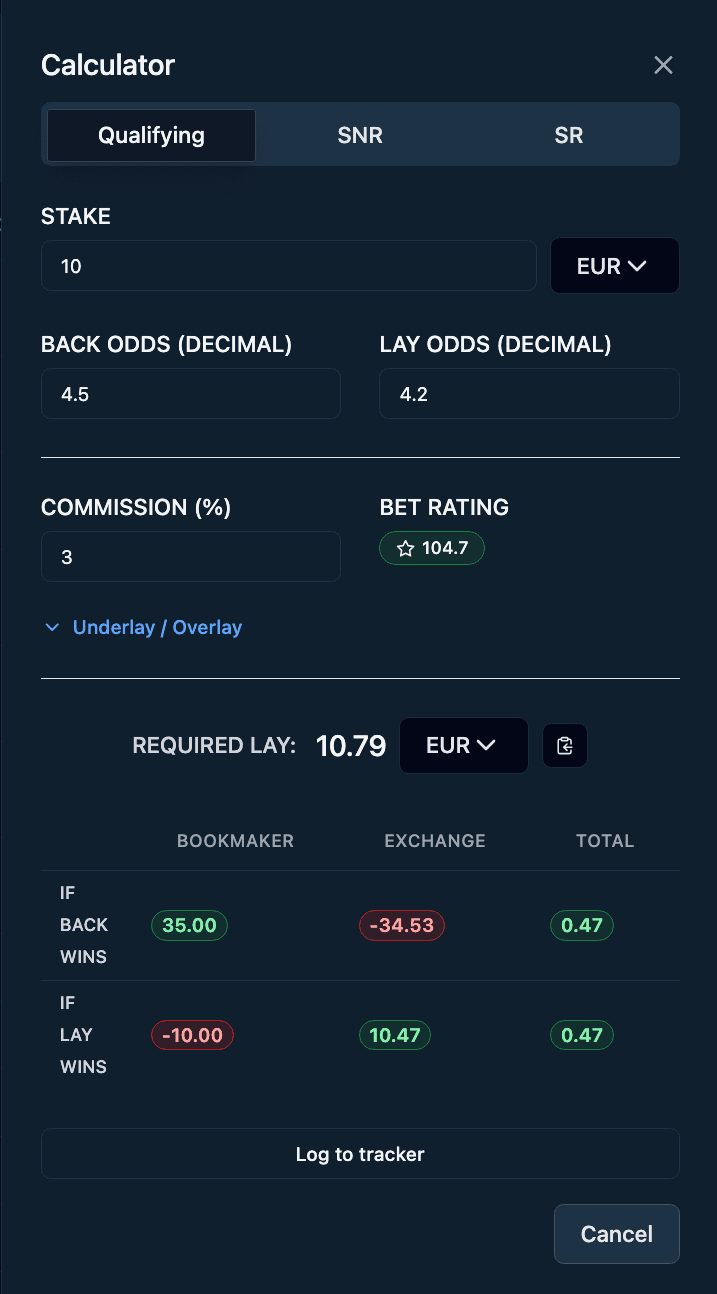
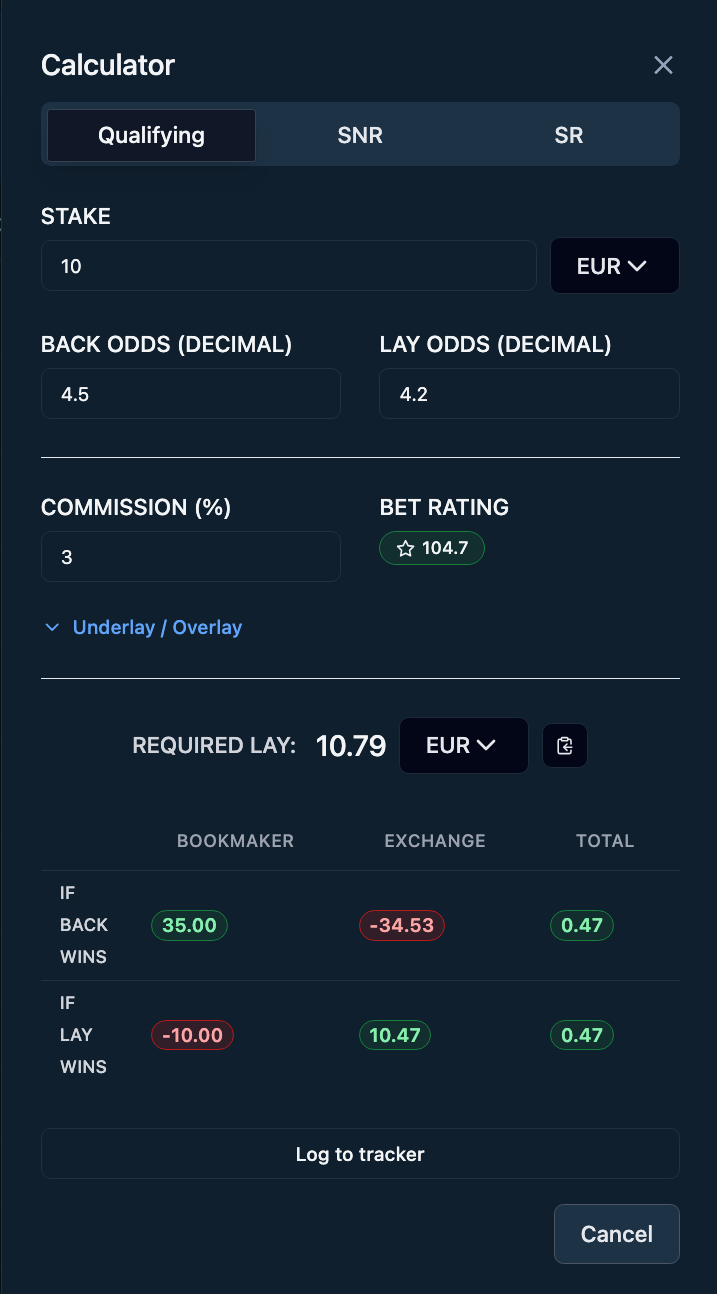
A 10 EUR qualifying bet at 4.5, laid at 4.2 with 3% commission: lay 10.79, and both results end at +0.47.
Good to know
With the standard lay the two totals are the same, so the result does not depend on the match.
Underlay and overlay
Underlay / Overlay opens a slider. Underlay lays less (more if the back bet wins, less if the lay wins); Overlay lays more. Standard is the balanced lay.
Min and Max start at the lay stakes where one of the two results breaks even. You can type your own.
A calculator without a row
The hub menu has Calculators for a bet you did not find here.
Place both bets
Back at the bookmaker
Click the price under Odds. The bookmaker opens in a new tab. Check the price, then bet your stake on the selection in bold under Match.
Lay on the exchange
Click the price under Lay. Lay the same selection at that price, with the stake from REQUIRED LAY:.
- SharkBetX and SBX Classic
- The market opens on sharkbetx.com with the lay slip filled in at the price you saw. Type the stake and place it there, signed in to your own SharkBetX account.
- Betfair Exchange
- Betfair Exchange opens on its front page. Find the match and the market there.
If a price moved
Put the price you actually got into the calculator. REQUIRED LAY: changes with it.
Check before you bet
A row is a snapshot from the last refresh. Prices at the bookmaker and the exchange can move in between, so always check both before you place.
Log it in the Bet Tracker
Where: The calculator, under the result table
Click Log to tracker under the calculator. It books the bet on your account at that bookmaker, with the stake and bet type from the calculator.
The Bet Tracker guide shows each field of that panel: log a bet from the Oddsmatcher.
Get alerts for your filters
Where: Alerts (the bell) in the header
An alert is a saved copy of the filters on screen. When a row matches it, you get a message on Telegram, in your browser, or both.
Set the filters first
Bookmakers, leagues, minimum rating, markets: the alert takes them as they are.
Click the bell
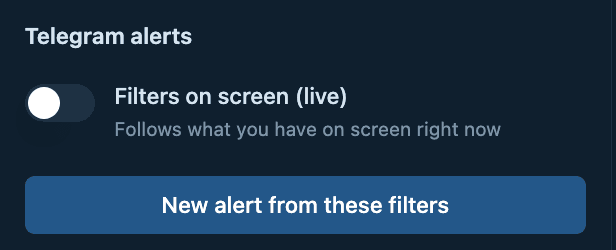
The Telegram alerts menu opens. If Telegram is not linked yet, it shows Connect Telegram to receive alerts, which takes you to the Alerts page.
Switch one on
- Filters on screen (live)
- Follows your filters as you change them.
- New alert from these filters
- Saves a fixed copy. Give it a Name and click Save; it is switched on when your plan has room.
How many
Free: 1 alert on at a time. Pro: 3. You can keep up to 10, switched on or off. At the limit, switch one off to switch another on.
Edit or delete a saved alert
The pencil opens Edit alert: change the Name, the exchanges under Lay on, or click Replace with the filters on screen. The bin deletes it.
Telegram alerts lay on SharkBetX or SBX Classic. With neither ticked under Lay on, both count.
Browser alerts
While the Oddsmatcher is open, your browser shows a notification for a row that is new to your filters or whose rating went up. The first check after you switch on only notes what is there.
Without Telegram they are always on. With Telegram linked, you choose on the Alerts page.
Old prices in an alert
When the bookmaker price has not changed for a while, the alert says for how long. From 12 hours it starts with Old price: check the bookmaker before you bet.
Every alert, Telegram linking and the other alert kinds are on the Alerts page.
Refresh and price age
Where: The header and the Age column
- Auto:
- How often the whole list reloads. Pro: 10s, 30s, 2m. Free: every 8m.
- Updated and next in
- When the list last loaded, and the countdown to the next load.
- The refresh button
- Reloads now. On the free plan it works once every 8 minutes; until then it is greyed out and says when it is back.
Good to know
On Pro the prices in the rows you see also update every few seconds between reloads, and SharkBetX lay prices as they change. The order of the rows only changes at the next reload.
So between reloads a row can briefly show a Rating under your minimum: it was above it when the list loaded.
After ten minutes without a click, key or scroll, the page stops reloading. It starts again as soon as you touch it.
The Age column
Age is how long ago the bookmaker price last changed: green up to 15 seconds, grey up to 90 seconds, faded after that. Hover it to see the exchange price's age too.
A price that has not moved for hours
It can be a market the bookmaker has stopped updating. Confirm the price on the bookmaker's site before you bet.
Hide a match
Where: The row icons, and Hidden above the list
Click the crossed-out eye on the row
Hide this match for me removes every row of that match from your list. Nobody else's list changes.
Bring it back
Hidden above the list shows how many you hid. Open it and click Unhide, or Unhide all.
Good to know
A hidden match comes back by itself at kick-off, or after 3 days if the kick-off is unknown.
Choose your bookmakers
Where: + Bookmaker, or Settings, Bookmakers
Two things decide which bookmakers you see: the ones switched on for your account, and the ones you tick in the filter. The filter can only narrow what is switched on.
Open the bookmaker menu
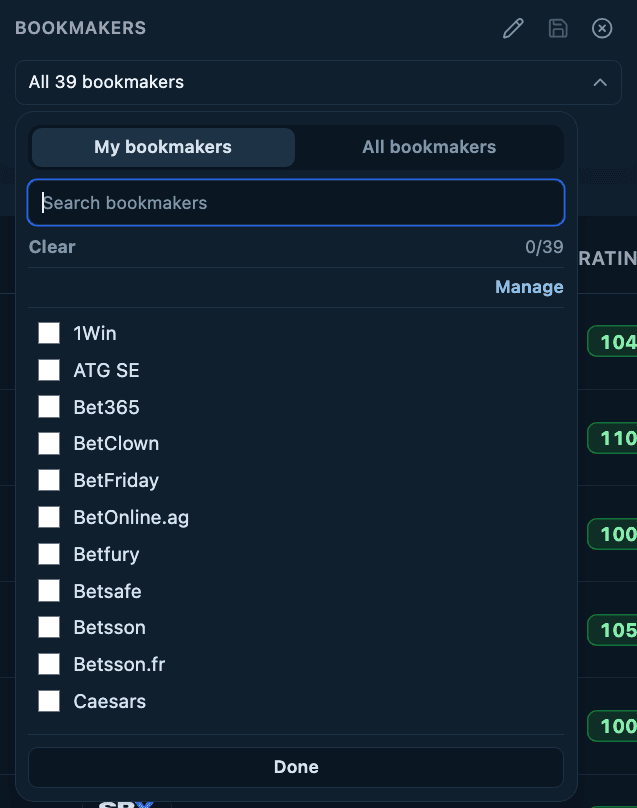
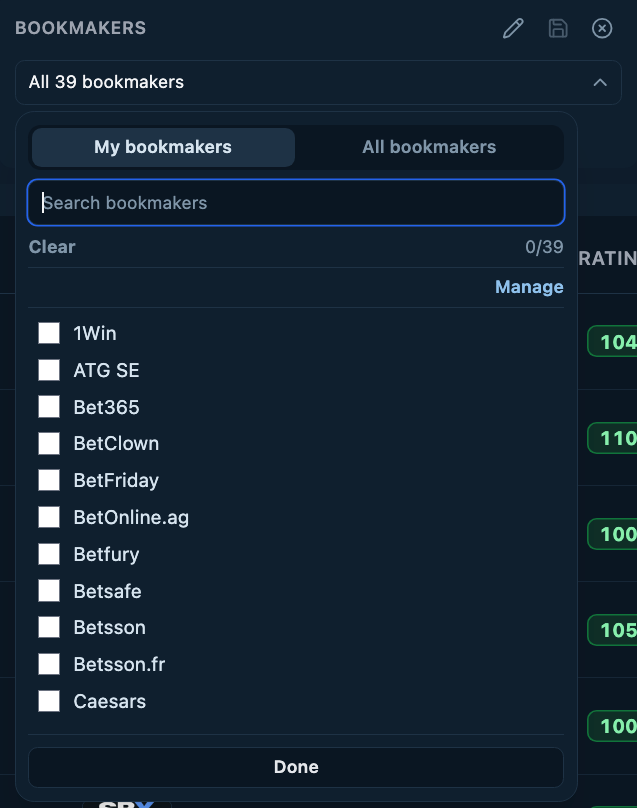
Click + Bookmaker. The My bookmakers tab shows how many are switched on, for example 2 of 2 enabled.
Switch one on
Under More bookmakers, tick one to switch it on for your account. A greyed-out row says why: your plan's limit, Pro only, parked or Not pulled yet.
Ask for one we do not show yet (Pro)
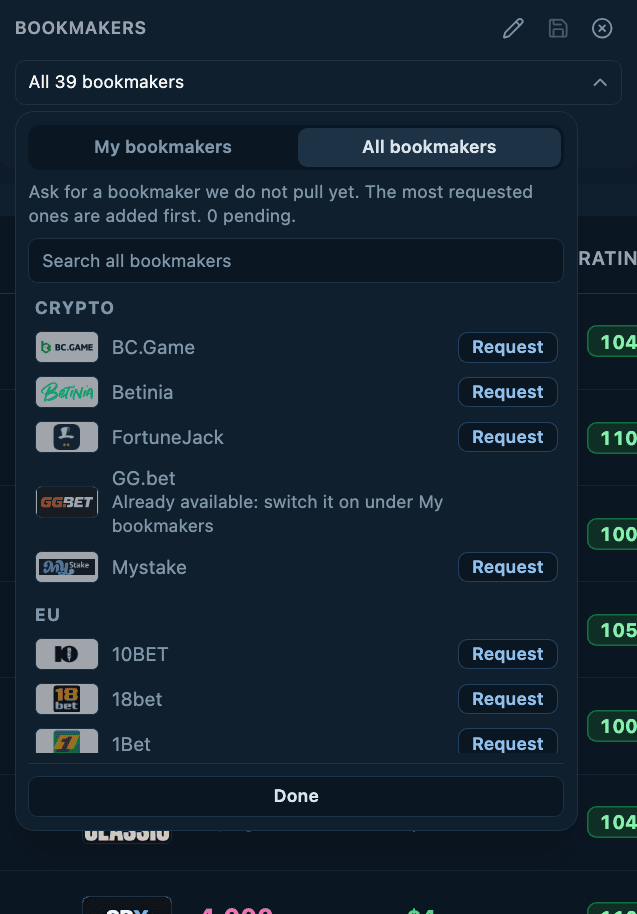
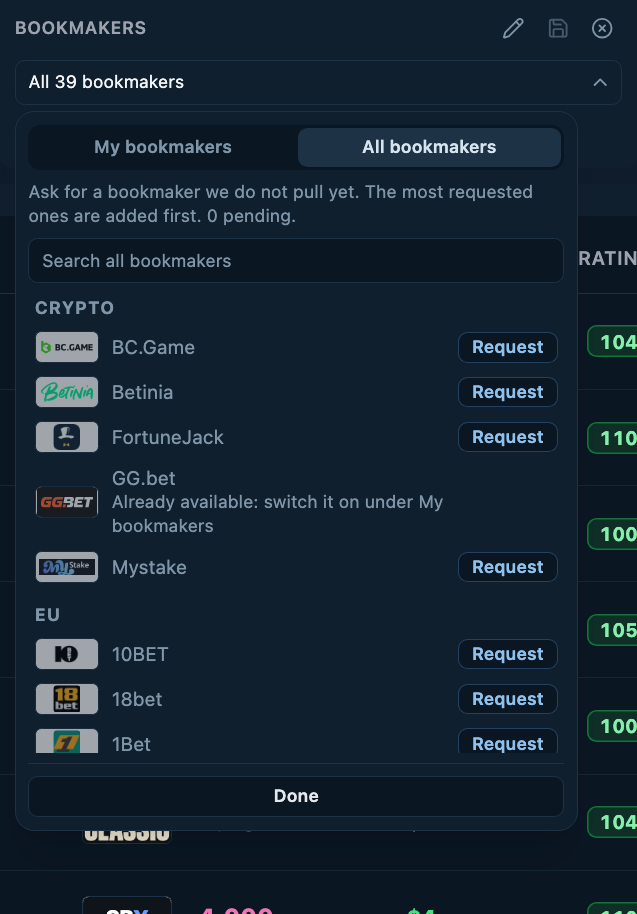
On the All bookmakers tab, click Request. Requests are looked at in a daily update, so a new bookmaker can take a day or more. You can have 3 requests waiting.
- Free
- 2 bookmakers, from the core list.
- Pro
- 20 bookmakers, including requested ones.
All of them on one page
Manage in the menu opens Settings on the Bookmakers tab: one switch per bookmaker, Enable all, Disable all and Reset to default, and your requests.
Bookmakers that went missing
Parked: after a plan change, bookmakers over the new limit are kept but switched off. A line above the list says how many; See which names them.
Restricted or closed in your Bet Tracker: the Oddsmatcher hides that bookmaker. Settings says so under it, with Show anyway.
No fresh odds or Maintenance next to a name: its feed is not updating, so its rows can be missing until it does.
Display settings
- Layout:
- Normal or Compact rows, in the filter panel.
- Odds format
- Settings, Preferences, Odds display: Decimal, American (US), Fractional or Percentage. The calculator stays in decimal.
- Show:
- 10, 20 or 50 rows a page, under the list, with Previous and Next.
- Remembered
- Your filters, sort order and page size stay in this browser. A change of filters takes you back to page 1.
What each plan gets
- Not signed in
- A preview: the top rows with the bookmaker and exchange names hidden, refreshed every minute.
- Free
- The full list, reloaded every 8 minutes. 2 bookmakers, 1 alert on at a time.
- Pro
- Reloads every 10s, 30s, 2m, with prices updating in between. 20 bookmakers, requests, 3 alerts on at a time.
- Pro Live
- The same Oddsmatcher as Pro, plus in-play odds in Live Odds.
Prices and what is included: see the plans.
On a phone
- The list has four columns: Match, Odds, Lay and Rating. What you can lay is under the lay price.
- Tap a row to open the calculator. Tap a price to open the bookmaker or the exchange.
- Match View is a link under the match. There is no hide button and no FB Rating column.
- Filters carries the whole panel. The panel's More adds Sort by (FB Rating included) and the time window.
- Exchanges, commission, layout and the refresh speed are not on a phone screen. Set them on a wider screen: exchanges and commission rates follow your account.
When the list is empty or looks wrong
- No matches found
- Your filters leave nothing. Lower the minimum rating, tick more markets or clear a chip. The button Show more opportunities (rating 95+) does the first.
- Only one exchange on
- SharkBetX alone has no DNB rows, SBX Classic alone only 1X2. The empty list says so: switch on another exchange or market.
- Couldn't load odds
- Usually a short hiccup. Click Retry.
- A limit message
- A free account that reloads very often is paused for a few minutes. Wait, then retry.
- No icons on the rows
- The icon column, with the calculator, needs room. Collapse the hub sidebar (the button beside the logo) or widen the window. Below about 1,280 pixels it is not shown at all.
- A row disappeared
- The match kicked off, you hid it, or its prices changed and it no longer fits your filters.
- A bookmaker is missing
- It is not switched on, parked, restricted in your tracker, or its feed is down. Your bookmakers.
- The price is different
- The bookmaker or exchange moved since the last load. Look at Age and the countdown, and use the price you get.
- Calculator rating differs
- COMMISSION (%) or a price in the calculator differs from the row, or Adj. commission is off.
Something in the Oddsmatcher does not match this guide? Tell us on the help page.