Tool guide
Live Odds guide
Matched betting while the match is on: live bookmaker back odds against live exchange lay odds, rated and refreshed every few seconds. Keep Live Odds open in another tab and go straight to the task you are on.
Live Odds needs a Sharkbetting account and live access: Pro Live, EUR 99 a month. What each plan sees.
Quick start
From an open page to a bet worth checking, in four steps.
- Open Live odds and pick a viewMatches shows one card per live match. All outcomes shows one row per bet.Show me how
- Find a rating worth a lookBest rating first. 100 is break-even, after commission.Show me how
- Check that both prices are freshUpdated shows the age of each price. Amber means one has not moved for a while.Show me how
- Check the prices again where you betOpen the match, work out the lay, and place both bets at today's prices.Show me how
- New to back and lay? Read the matched betting guide first.
- The table is empty? See why.
- Betting before kickoff? That is the Oddsmatcher.
Live Odds at a glance
Where: Hub menu, Find a bet, Live odds
The menu calls it Live odds. The page heading says Live Odds Matcher. Older posts call it the live matcher. All three are this page.
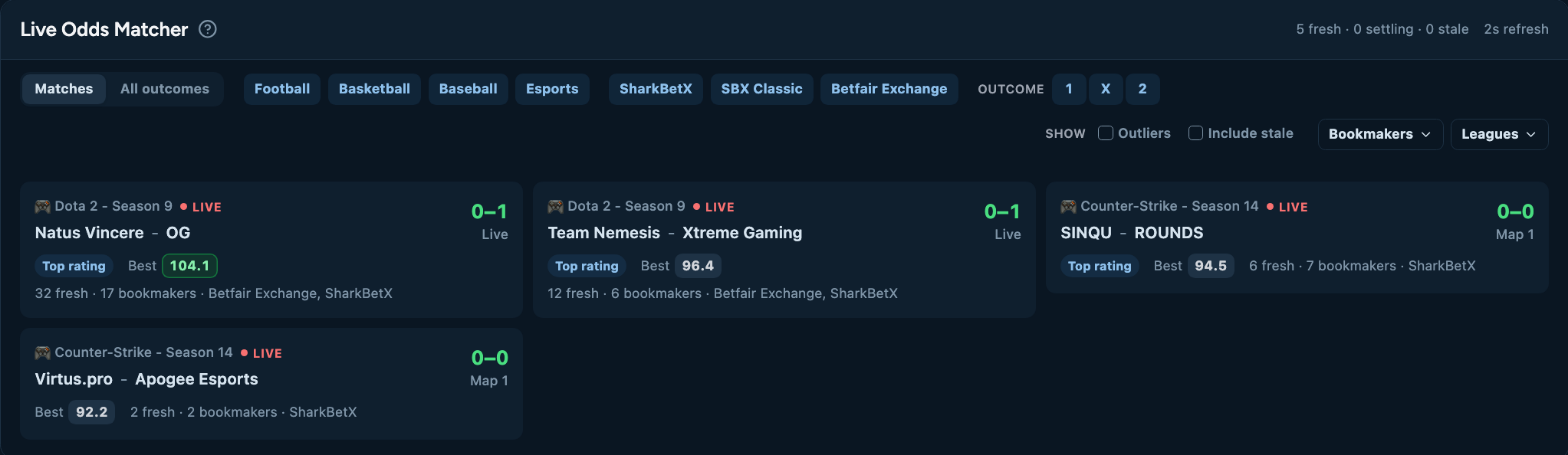
- Heading row
- The ? after the heading opens a short explanation and Read the Live Odds guide. At the right: a dot while a refresh is under way, the count of fresh, settling and stale outcomes, and the refresh rate.
- View switch
- Matches: one card per live match. All outcomes: one row per outcome across every live match. The page remembers your choice.
- Filter rail
- Sports, exchanges, outcome 1 X 2, limits, the Show options and the Bookmakers and Leagues lists. Filters.
What is on it
Only matches in play, and only the match result market: home, draw, away. Each price pairs a bookmaker's back odds with a lay on SharkBetX, SBX Classic or Betfair Exchange.
The bookmakers are the ones switched on for your account, the same set as in the Oddsmatcher.
Who sees live data
Live Odds is for signed-in members. Signed out, the page sends you to sign in. Live prices are part of Pro Live.
- Free plan
- The heading and a card, Live odds are part of Pro Live, with See plans. No prices, no filters.
- Pro, while live is included
- Everything, with a card above it: Live odds are free for you until the date it names, and How to keep it after that. Fold it to one line with the arrow.
- Pro, after that date
- The same card as the free plan, with Upgrade to Pro Live · EUR 99/month next to See plans.
- Pro Live
- Everything, with no card.
Good to know
In the menu, Live odds carries a small Pro Live tag while your plan has no live access. It goes away when it does.
What happens when you click Upgrade
With a card subscription, a window shows what is charged to your card today and what you pay after that. Nothing is charged until you confirm with the pay button.
While live is still free for you, the window says so and offers Keep my free access. Without a card subscription you go to the checkout page, which shows the price.
Read the match cards
Where: View switch, Matches
One card per live match, in kickoff order, so the cards keep their place as prices move.

- Top line
- Sport, league, the teams, the score and the match clock.
- Top rating
- Marks up to 3 matches with the best rating right now. It moves to another card only when that card is clearly better.
- Best
- The best rating on the match over fresh prices. It shows only from 90 up.
- Counts
- For example 12 fresh · 4 bookmakers · SharkBetX, Betfair Exchange: how many fresh prices, how many bookmakers, and which exchanges.
- Settling
- The score just changed. What settling means.
Open a match
Click the card. Match View opens in live mode: every bookmaker against the exchange for that match, refreshed every 2 seconds.
All live matches above the match brings you back here. How to read Match View live.
Good to know
Only the sport chips change the cards. The exchange, outcome, bookmaker, league and Show settings act on All outcomes, and on the counts in the heading row.
Read the outcome table
Where: View switch, All outcomes
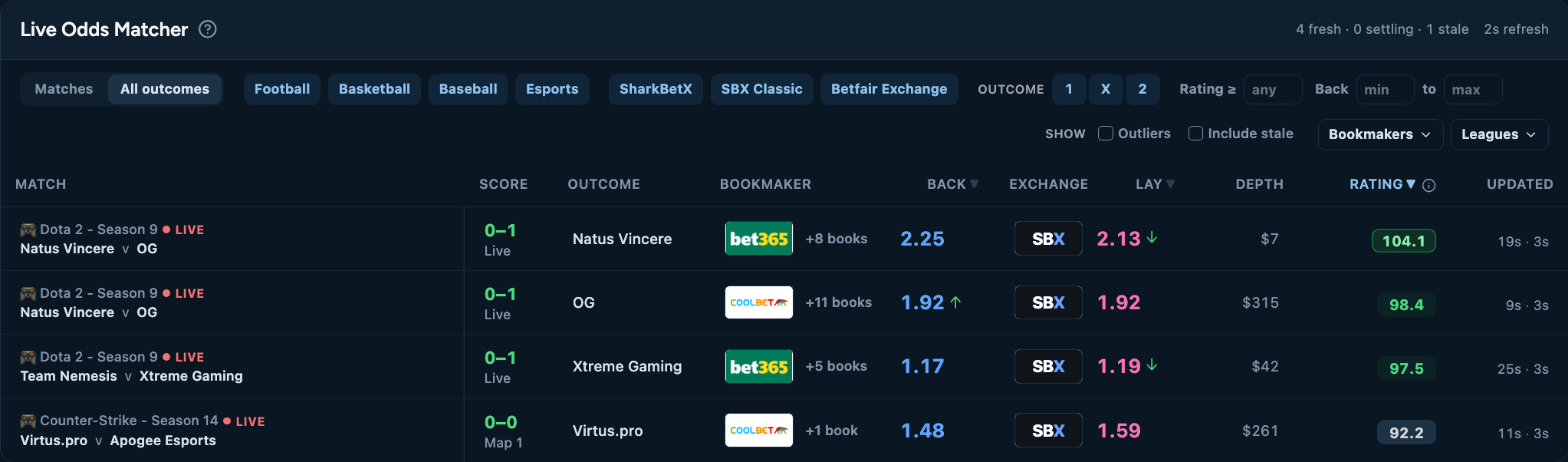
One row per outcome of a live match, for example the home win. The row shows the best back price and the best lay price for it. Best rating comes first.
Good to know
The table lists outcomes rated 90 or more. Lower ratings are left out, and so are markets that look suspended. Outliers under Show brings both back.
A narrow window
The table needs about 1,160 pixels of width. In a narrower window, a laptop screen included, it scrolls sideways: scroll right to reach Rating and Updated. Match stays in place while you scroll.
To fit it all, fold the hub menu with the button beside the logo (Collapse sidebar).
What each column means
- Match
- Sport, league and the teams. It stays in place when you scroll sideways.
- Score
- The score and the minute, for example 67′. Injury time reads 45+′ or 90+′. Without a minute, the match status shows instead, for example Live or the inning. A dash means no score yet.
- Outcome
- The team, or Draw.
- Bookmaker
- Where the best back price is.
- Back
- The best back odds among the fresh prices.
- Exchange
- Where the best lay price is.
- Lay
- The lowest lay odds that has money behind it, among the fresh prices.
- Depth
- The lay stake you can place at that lay price: in dollars on SharkBetX and SBX Classic, in euros on Betfair Exchange.
- Rating
- The best rating for the outcome over its fresh prices. While the score settles, a Settling badge takes its place.
- Updated
- Two ages: the bookmaker price, then the exchange price, for example 4s · 12s. Fresh, settling and stale.
The rating
The share of your stake you keep after laying, commission included. 100 is break-even. It is the same rating as in the Oddsmatcher, at the commission rates you set there. How the rating works.
From 97 the badge turns light green, from 100 strong green.
The small arrows beside a price
A price that changed at the last refresh flashes and shows an arrow for a few seconds. The arrow points the way the odds moved.
Green means the move is in your favour: a back price up, or a lay price down. Red means the opposite: a back price down, or a lay price up.
See every bookmaker for an outcome
Click +2 books next to the bookmaker
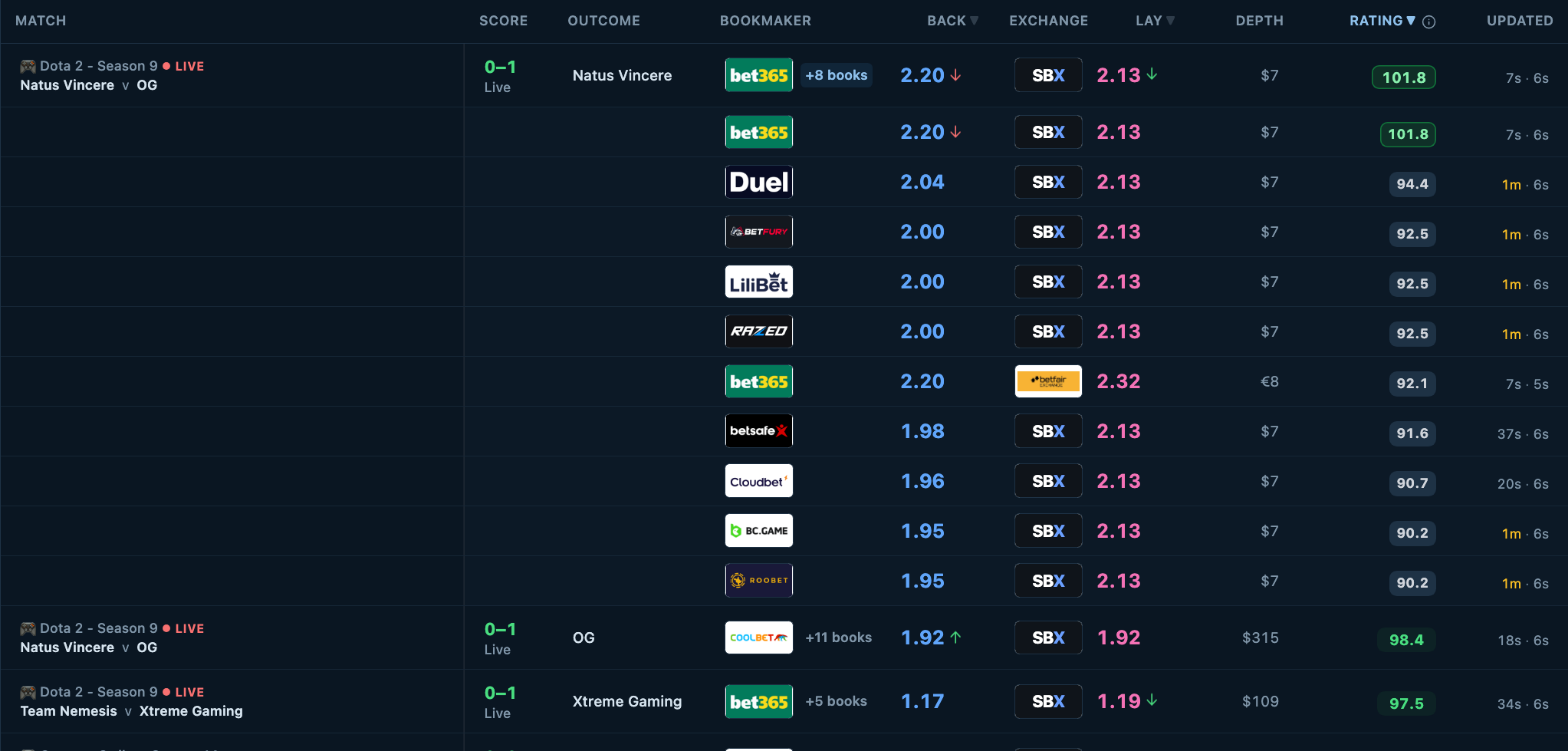
The number is how many other bookmakers price this outcome. Their rows open under it, each bookmaker paired with each exchange, with its own rating and ages.
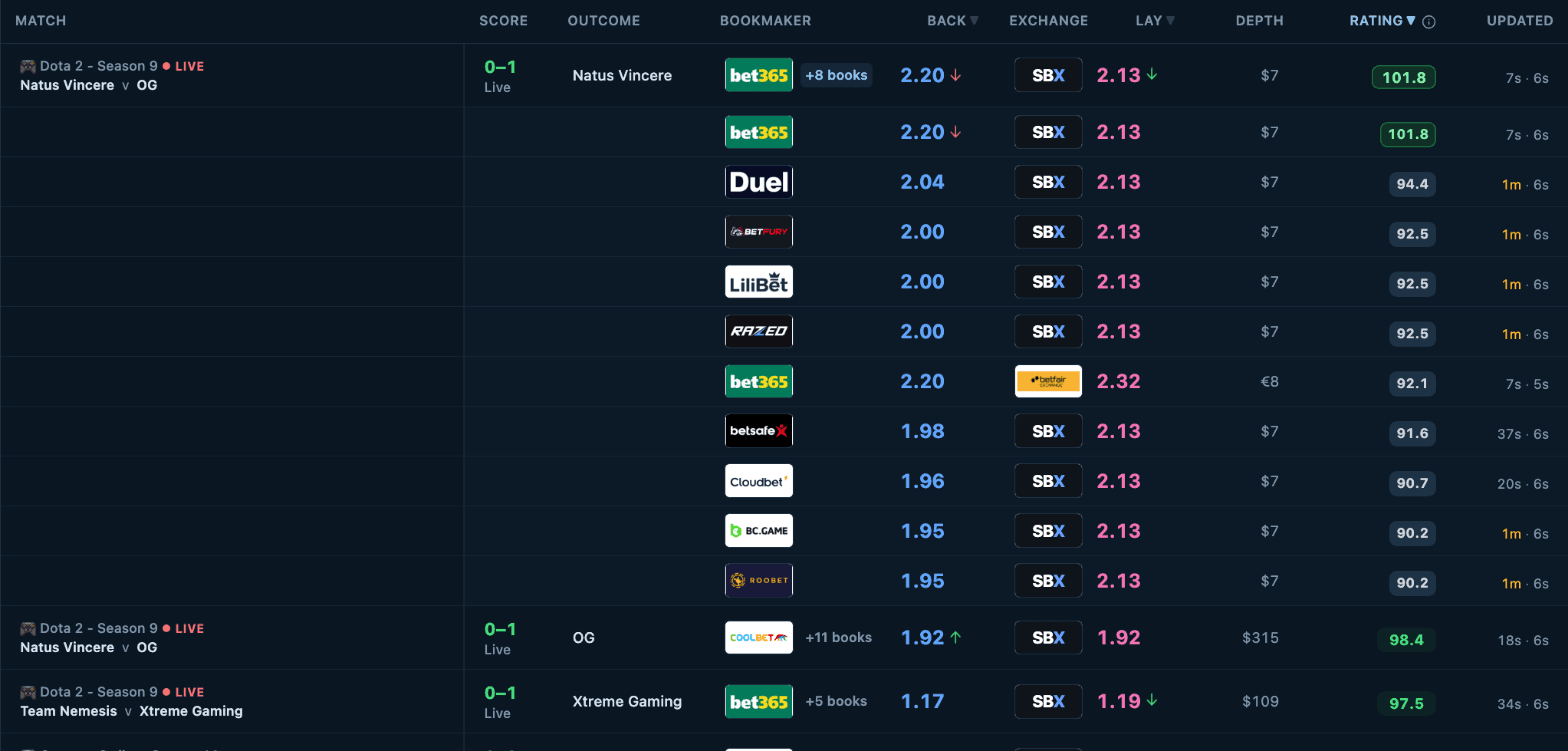
Swipe sideways to see all of it, or tap to open it. Click it again to close them
Good to know
On the main row, the best back and the best lay can come from different pairs. The rating there is the best single pair. The open rows show each pair as it is, stale ones included, with their ages in amber.
Fresh, settling and stale
Every price pair is in one of three states. The page reads them from the ages and the score.
- Fresh
- Both prices moved in the last 45 seconds. The row looks normal.
- Settling
- The score changed. For 60 seconds the rating is on hold with a countdown, for example Settling · 0:42. Then it waits as Settling until both sides have re-priced. The row is greyed.
- Stale
- The bookmaker or the exchange price has not moved for more than 45 seconds. That age turns amber.
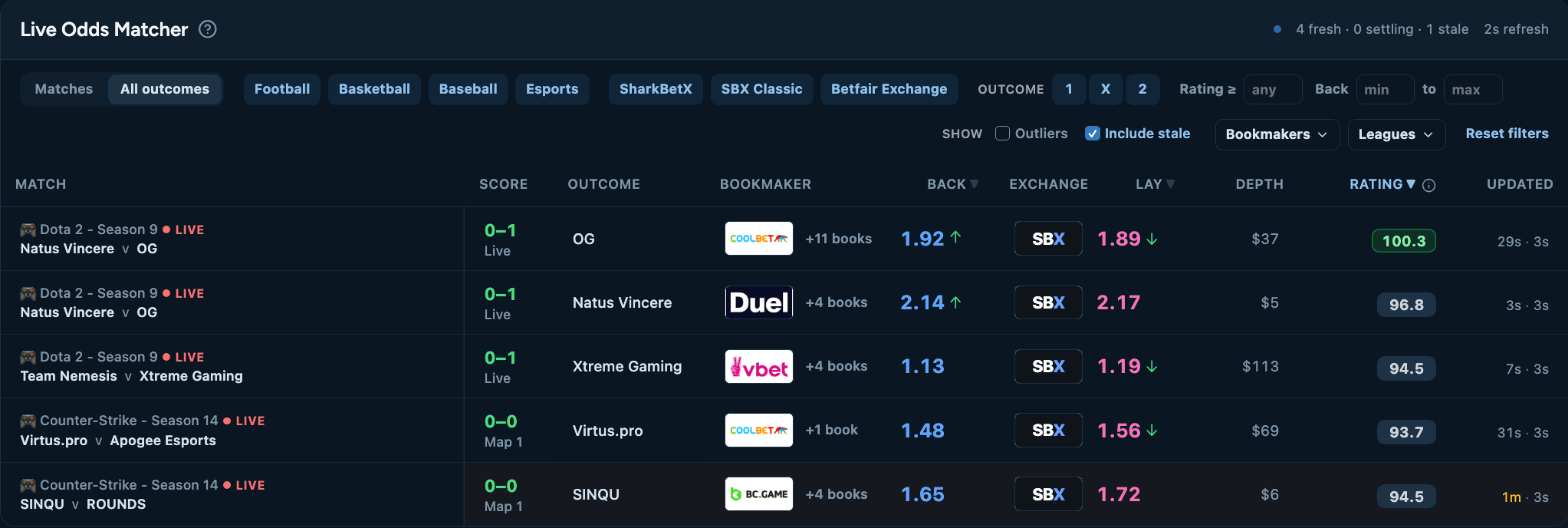
Why stale rows are hidden
A rating is only as fresh as its older price. When one side has not moved, the other may already have, and the rating is no longer real.
Stale outcomes are hidden. Include stale under Show brings them back, at the bottom of the table with an amber tint.
The counts in the heading row
For example 18 fresh · 2 settling · 3 stale (5 filtered). It counts outcomes, not prices, after your filters. The number in brackets is how many your filters hide.
Fresh outcomes always sort above settling ones, and settling ones above stale ones.
From a row to a bet
Live Odds shows prices. It does not place bets. You place the back bet at the bookmaker and the lay on the exchange yourself.
Open the match
In Matches, click the card. From All outcomes, open the same match from Matches; a table row does not open it.
Work out the lay in the calculator
In Match View, click a fresh back price. It opens the Oddsmatcher's calculator for that back price and the exchange lay. How the calculator works.
Good to know
The calculator keeps the prices from the moment you click. They do not follow the live prices. In live mode it opens only from a price marked fresh.
Check both prices where you bet
Before you place each bet, compare the odds at the bookmaker and on the exchange with the ones you calculated. If either has moved, work it out again.
Log it in the Bet Tracker by hand
The calculator in live mode has no button to log the bet. Add the back bet and the lay in the Bet Tracker yourself. How to log a back bet and its lay.
What it can and cannot promise
In-play prices move while you click. This is what the page does about it, and what it cannot do.
- It shows
- How old each price is, on every row. It holds ratings for 60 seconds after the score changes, hides stale outcomes and leaves out markets that look suspended.
- It cannot promise
- That a price is still there when you reach the bookmaker or the exchange, that the lay stake under Depth is still free, or that a market is open.
- Suspended markets
- Suspended and near-settled markets can show extreme ratings. The page leaves them out unless Outliers is on. A price can still vanish while you look at it.
- Delays
- The page refreshes every 2 seconds and the prices themselves can be some seconds old. The Updated ages show how old.
Check before you place
The page cannot see a price change between its last refresh and your click. Check both prices just before you place each bet.
Filters
Where: The filter rail under the heading
- Sports
- Football, Basketball and Baseball are always there. Other sports, such as Esports, appear while they have live matches. Click a chip to hide or show a sport.
- Exchanges
- SharkBetX, SBX Classic and Betfair Exchange: which exchanges the lay may come from. Only exchanges that are switched on for the hub show a chip.
- Outcome
- 1 home, X draw, 2 away. Turn off a side you never bet.
- Show
- Outliers: suspended or near-settled markets and ratings under 90. Include stale: outcomes with a price older than 45 seconds. Both are off by default.
- Bookmakers and Leagues
- Tick the ones to show. The lists hold what has been live since you opened the page, so they fill up as matches start.
- Reset filters
- Appears when anything is filtered. Puts every filter back, but keeps the view and the sort.
Good to know
One sport, one exchange and one outcome always stay on. A click that would turn off the last one does nothing.
The Bookmakers menu
Click Bookmakers
The My bookmakers tab lists the bookmakers seen in play since you opened the page, all ticked. Untick the ones to hide, or use All and None. Search bookmakers narrows the list.
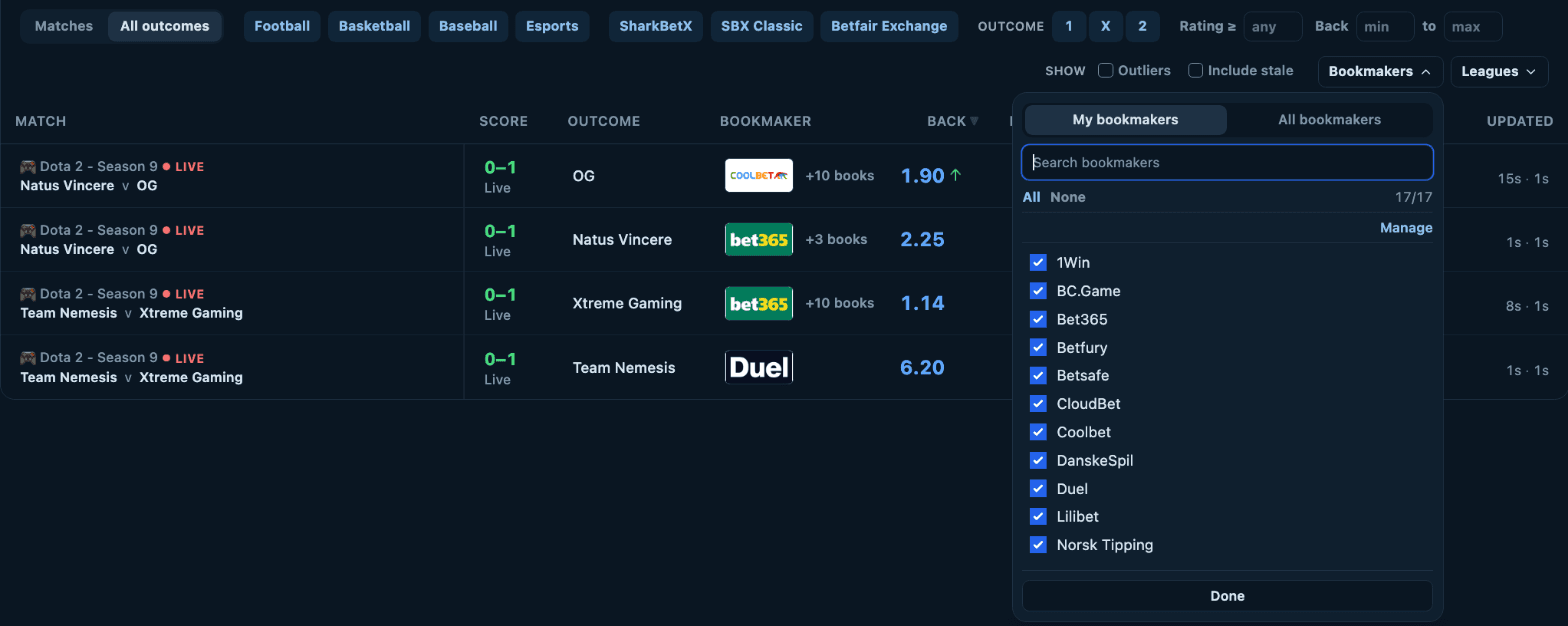
Swipe sideways to see all of it, or tap to open it. Click Done
While some are unticked, the button shows how many are ticked, for example 15/17.
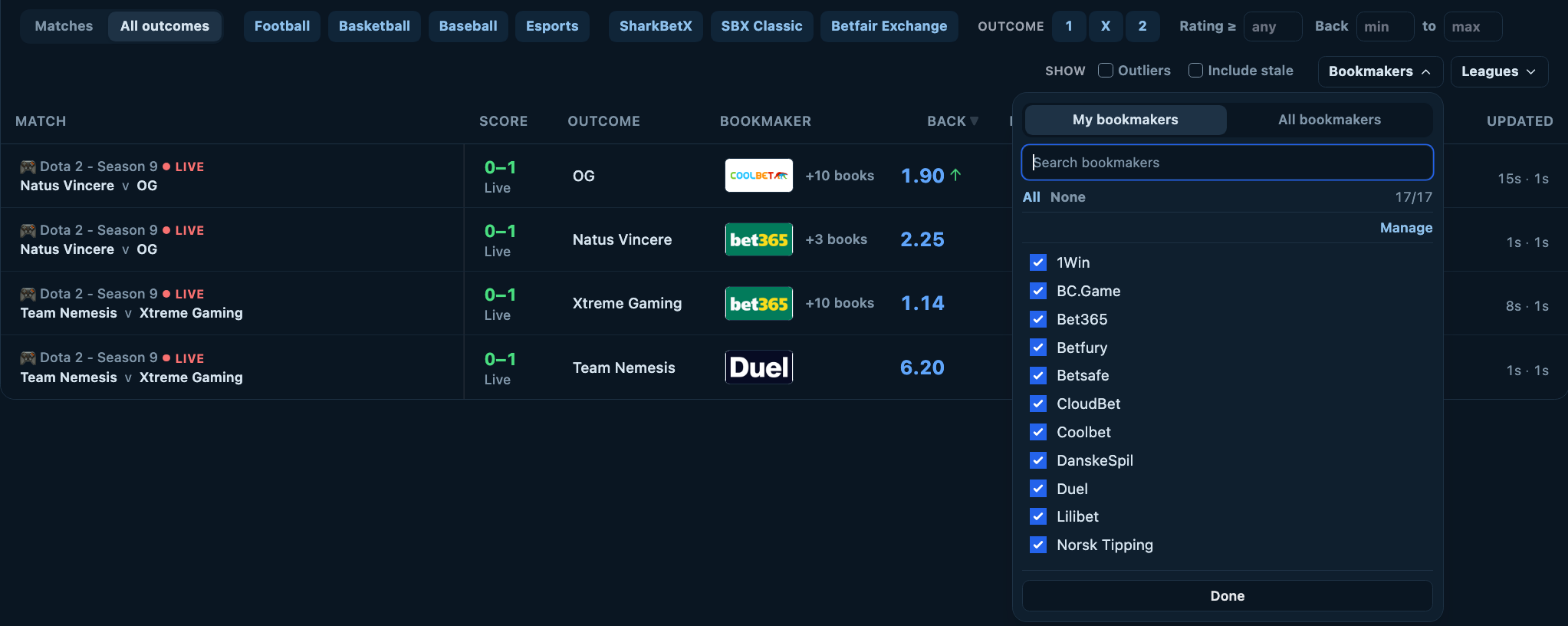
Switch on more bookmakers
Manage and the All bookmakers tab are the Oddsmatcher's: they change which bookmakers your account has, on every tool. How it works.
Sort and set limits
Where: All outcomes
Click Back, Lay or Rating at the top of a column
The first click sorts highest first, or lowest first for Lay. A second click turns it round. The arrow shows the column in use.
Good to know
Inside any sort, fresh outcomes stay above settling ones, and settling above stale.
Set a rating floor or an odds band
Type a number after Rating ≥ to hide lower ratings. Type a minimum and a maximum after Back to keep the best back odds inside that band.
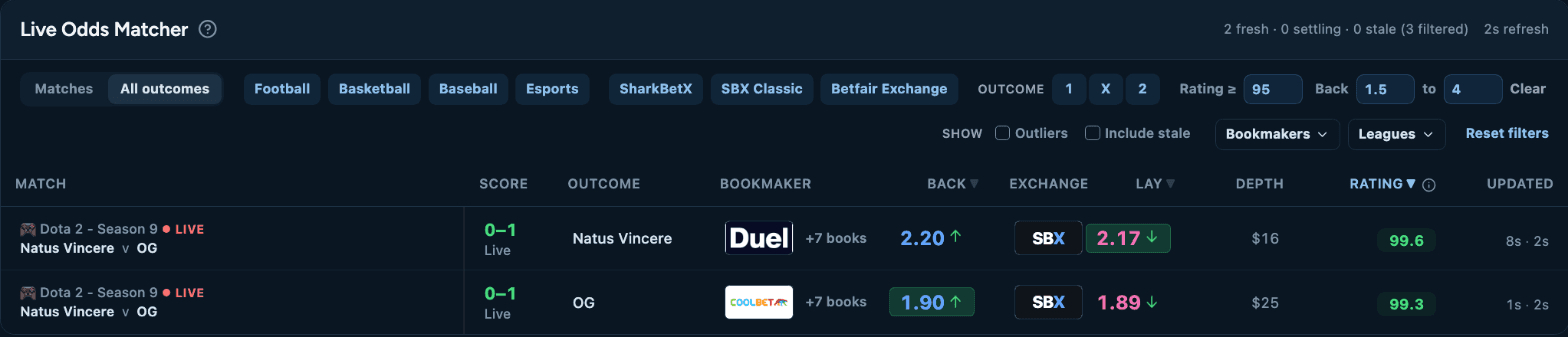
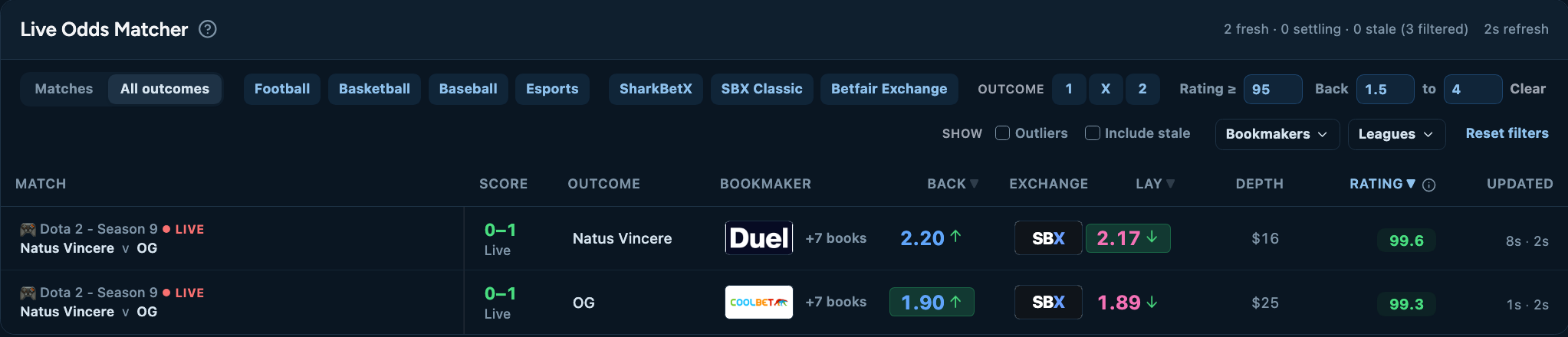
Rating 95 or more and back odds from 1.5 to 4: two outcomes left, three filtered. Swipe sideways to see all of it, or tap to open it. Clear empties all three boxes. An empty box means no limit.
A box turns red, or says min is above max
A red box holds something that is not a number, and the previous limit still applies. Commas work as decimal points.
min is above max means the band is the wrong way round, so nothing fits in it.
Refresh and pauses
- Matches in play
- Every 2 seconds. The heading row shows 2s refresh.
- Nothing in play
- Every 15 seconds, until a match starts. Matches in sports you have hidden count as nothing.
- Another tab in front
- No refresh while the tab is in the background.
- 10 minutes without input
- No mouse, keyboard, scroll or touch: the refresh stops. Move the mouse or touch the screen and it starts again.
Good to know
While the refresh is stopped, the prices and their ages stay as they were. Move the mouse before you read a price after a break.
On a phone
- The filters sit behind Filters next to the view switch. The number on it is how many filters are changed.
- The match cards stack in one column.
- The outcome table scrolls sideways, as in any narrow window. Match stays in place, so you always see which match a price belongs to.
Nothing shows, or it looks wrong
The page says why it is empty. Find the message here.
- No live matches right now
- No tracked match is in play. When the next kickoff is known it is named, for example next kickoff 17:30 and the league. The page fills on its own when a match starts.
- Every live match is in a hidden sport
- The live sports are named. Turn one of them on in the sport chips.
- Every live outcome has a stale price
- Every outcome has a price older than 45 seconds. Turn on Include stale to see them anyway.
- No live outcome is inside the rating and odds limits
- Lower the rating floor, widen the back odds band, or click Clear.
- All live outcomes are filtered out
- Turn on more sports, outcomes, bookmakers, leagues or exchanges, or click Reset filters.
- Failed to load live odds or Failed to load live matches
- The page could not reach the prices. It tries again on its own; reload if it stays.
A match I can see elsewhere is not here
A match shows only while it is in play, a bookmaker you have switched on prices it, and an exchange has a fresh lay for the same outcome. If any of the three is missing, it is not listed.
Only the match result market is covered, so a match with only other markets live does not show.
A rating looks far too good
Check the Updated ages and the score first. An old price on one side, or a goal a moment ago, explains most of them. Then check both prices where you bet.
Something in Live Odds does not match this guide? Tell us on the help page.