Tool guide
Dropping odds guide
The board lists prices that are falling at Pinnacle, the sharp reference, and the matches they belong to. Keep it open in another tab and go straight to the task you are on.
The board comes with a free Sharkbetting account, and a public copy is open to everyone. Telegram alerts need a paid plan.
Quick start
From the menu to your first drop worth a look, in four steps.
- Pick a sport and a windowFootball and Since opening are the defaults. 12 h shows the fresh moves.Show me how
- Read the rowPinnacle open, Pinnacle now, and the Drop for the window you picked.Show me how
- Open the matchClick the match to compare every bookmaker against the exchange in Match View.Show me how
- Get it on TelegramOn a paid plan, Telegram alert saves the filters, and matching drops come to your chat.Show me how
- The board shows nothing? What each message means.
- Wondering whether following drops pays? Dropping Odds: Does Following Them Actually Work?
The board at a glance
Where: Hub menu, Dropping odds (address /drops)
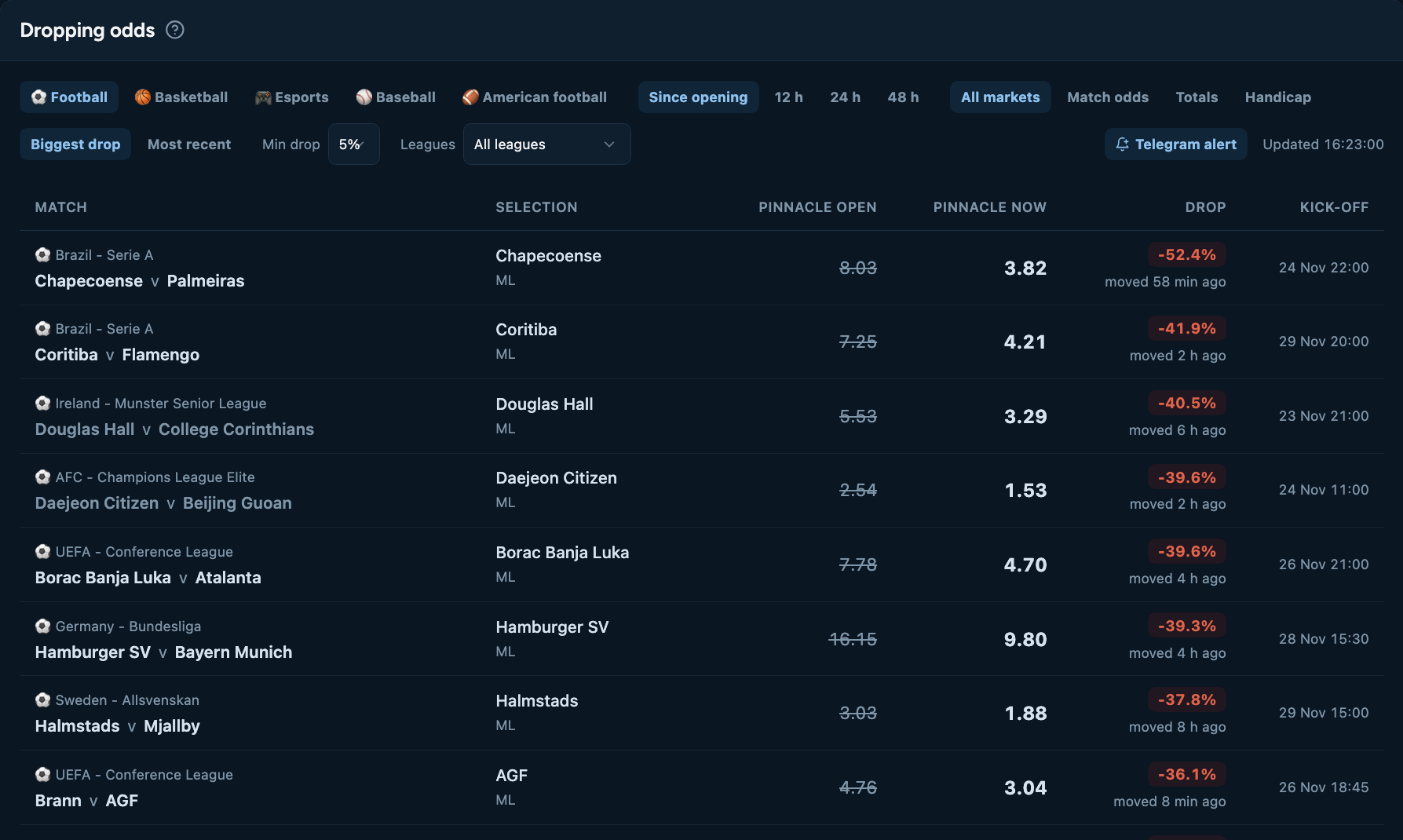
- Filters
- Sport, window, markets and sort as chips, then Min drop and Leagues. At the right: Telegram alert and the Updated time. On a wide screen they take two rows.
- Your drop alerts
- Your saved alerts. The list appears once you have saved one.
- The table
- One row per selection whose Pinnacle price has fallen, with the match it belongs to.
- Under the table
- A line that says the prices are Pinnacle's, then Previous, the page number and Next.
Every price on the board is Pinnacle's. A price that keeps falling there means money came for that side; the bookmakers that have not moved yet are the ones to check.
Good to know
The ? next to the page title holds a short version of this, and a link back to this guide.
Filter the board
Where: The filter row above the table

- Sport
- Football, Basketball, Esports, Baseball, American football. One sport at a time.
- Window
- Since opening, 12 h, 24 h, 48 h. Since opening is the whole move from Pinnacle's first price. The others are the fall within the last 12, 24 or 48 hours.
- Markets
- All markets, Match odds, Totals, Handicap. A row names its market in the feed's short form: Match odds rows read ML, Totals rows Totals, Handicap rows Spread.
- Sort
- Biggest drop puts the deepest drop for the window first. Most recent puts the newest price moves first.
- Min drop
- 3%, 5%, 10%, 15%, 20%. Hides drops smaller than this for the window.
- Leagues
- All leagues, Top leagues (a short list of the biggest leagues per sport) or Top + tracked leagues (also every league the Oddsmatcher prices).
The board opens on Football, Since opening, All markets, Biggest drop, 5% and All leagues.
All markets is more than the three chips
With All markets you also get first-half lines (Spread HT, Totals HT), team totals, corners, bookings and player lines. A player line reads, for example, Over 0.5 with the player's name under it.
Pick Match odds, Totals or Handicap to narrow the board to that market.
Good to know
Your filters are written into the page address, so a bookmark or a shared link opens the same view. Every change takes you back to page 1.
Which leagues count as top leagues
Football: the top divisions of England, Spain, Germany, Italy, France, the Netherlands and Portugal, the three European club competitions, the World Cup and its qualifiers, the Euros and the Nations League.
Basketball: the NBA, EuroLeague, EuroCup, Liga ACB and the NBL. American football: the NFL. Baseball: MLB.
Esports has no top list, so Top leagues shows the leagues the Oddsmatcher prices.
Pages: 50 rows each, up to 10
A page holds 50 rows and the board goes to page 10 at most. Next is greyed out when a page comes back with fewer than 50 rows. After a full page it stays open, and the page after can turn out empty.
With Top leagues or Top + tracked leagues, the board picks from the first 200 drops it gets for the sport. On a busy day a small drop in a top league can sit outside those 200.
Read a row

- Match
- Sport icon and league, then the two teams. Click it to open the match in Match View.
- Selection
- What fell: a team, Draw, or a total such as Over 2.5. A handicap carries its line from that side's view, such as Liverpool -1.5. Under it is the market, such as ML, Spread or Totals HT, or a player's name.
- Pinnacle open
- Pinnacle's first price for the selection, struck through.
- Pinnacle now
- Pinnacle's price at the last update.
- Drop
- How far the price fell in the window you picked, in percent. Under it, moved 4 min ago says when Pinnacle's price last changed, in minutes, hours or, past two days, days.
- Kick-off
- Date and start time, in your own time zone.
How the drop is measured
The percentage comes with the price feed; the board does not work it out. In Since opening it is close to the fall from Pinnacle open to Pinnacle now, as a percent of the open price: 8.03 to 3.82 shows -52.4%.
It can differ by a few tenths from what the two rounded prices give: 2.11 to 1.64 shows -22.5%, where the sum gives 22.3. The board rounds it to one decimal and drops a trailing .0, so -11% sits beside -10.5%.
In the 12 h, 24 h and 48 h windows
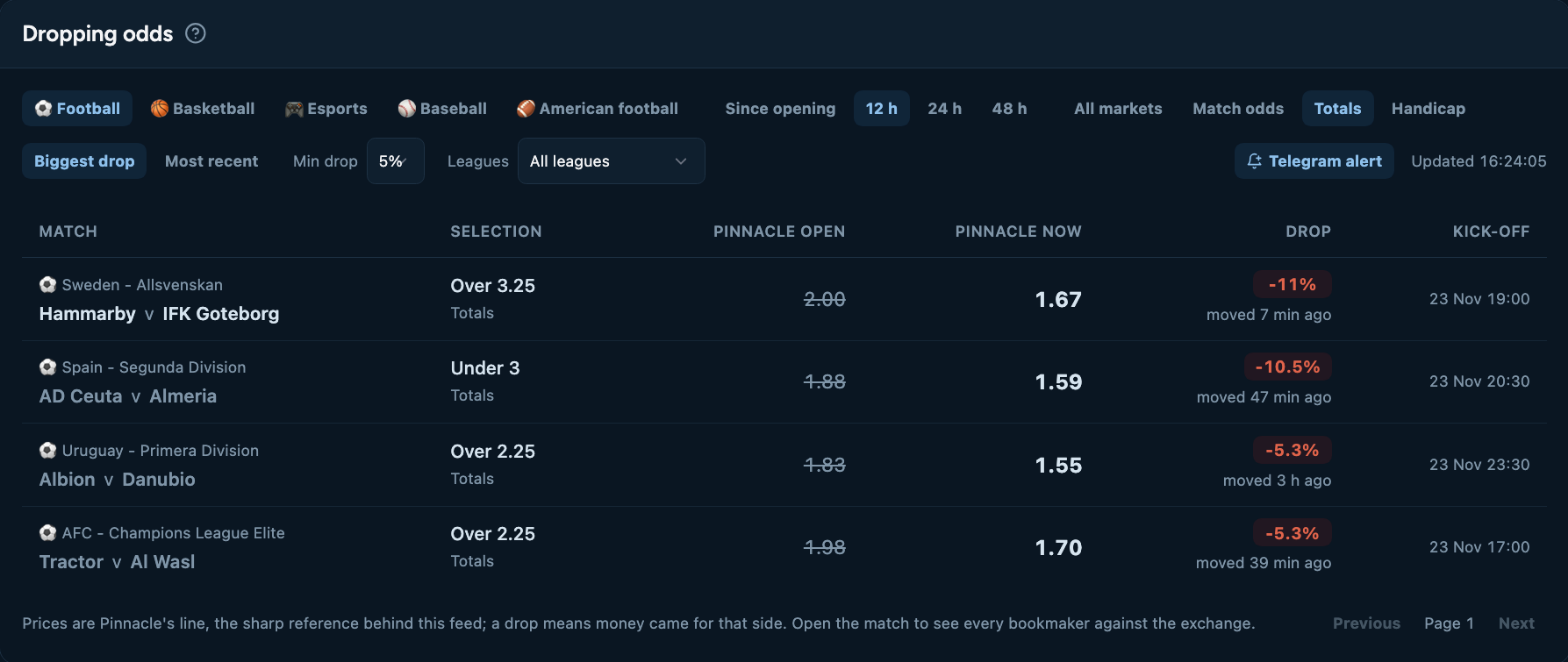
Drop is the fall within that window only. Pinnacle open still shows the first price, so the two prices beside the drop describe the whole move, not the window.
On 12 h below, 2.00 to 1.67 is a fall of 16.5%, but the Drop reads -11%.
Greyed rows with no link
A match in grey that does not open is in a league the Oddsmatcher does not price, so Match View has nothing to show for it. Hover it to read Not priced in the oddsmatcher: this league is outside the leagues we track.

It stays on the board so you still see the move. To leave such leagues out, set Leagues to Top + tracked leagues.
The list of priced leagues is read again every ten minutes, so a row can be grey on one load and normal on the next.
When a row leaves the board
The board shows the drops as they stand at each update. A row goes when its drop for the window is no longer above Min drop: the price came back, or the fall is older than the window.
The board keeps no history of its own: a row that has gone cannot be looked up again here.
Act on a drop
Check the selection and the kick-off
Make sure it is the market and the line you would bet, and that the match has not started.
Open the match in Match View
Click the match. Match View lists every bookmaker's price beside the exchange, so you see which books have not moved yet. How to read it is in the Match View guide.
Good to know
Match View shows match odds (1, X, 2). For any row whose market is not ML, the line you saw is not on it: look it up in the Oddsmatcher instead.
Or find the same selection in another tool
In the Oddsmatcher, type a team into Search team or league to price it for matched betting: see the Oddsmatcher guide.
To check whether a soft book still sits above the fair price, use the Value matcher: see the Value matcher guide.
The board has no price chart. Match View has a Line movement card for the match's SharkBetX market.
Get drop alerts on Telegram
Where: Dropping odds to save an alert, Alerts to choose where it arrives
An alert is the board's filters, saved. When a price matching them drops, the Sharkbetting bot sends a message to your own Telegram chat. You can keep up to 5 alerts. They are part of the paid plans.
Connect Telegram, once
Open Alerts
In the hub menu, open Alerts.
Connect the bot under My alerts
Click Generate connect link, then Open bot, and send the bot the code you see. Back on the page, click I connected the bot.
Keep Telegram alerts on
The Telegram alerts switch under My alerts must be on. Drop alerts arrive through this bot.
A separate bot for drop alerts (optional)
To mute drop alerts apart from your Oddsmatcher alerts, open Use a separate bot for drop alerts (optional) in the Dropping odds card and click Connect dropping odds bot. The code steps are the same.
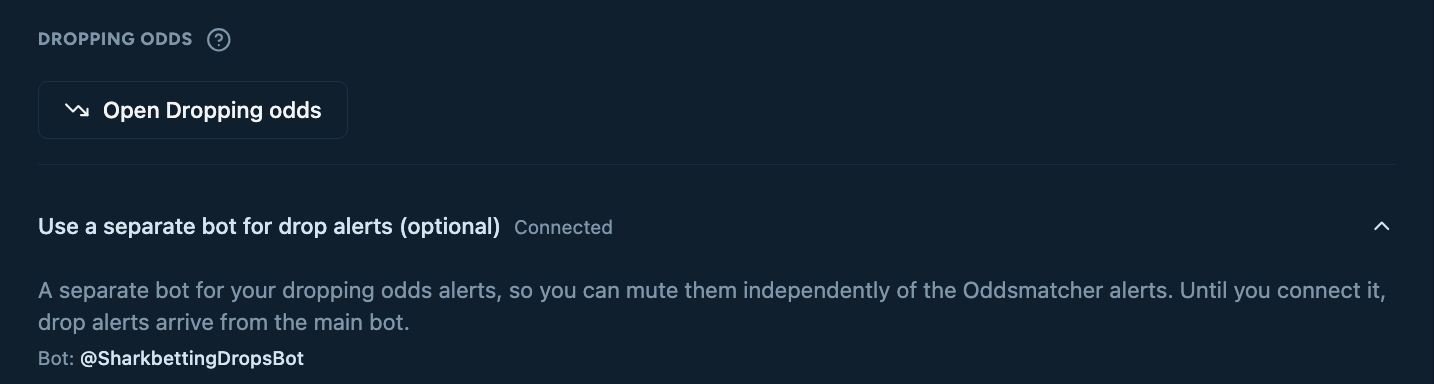
From then on drop alerts go to that bot only. Its Dropping odds alerts switch pauses them, and they do not fall back to the main bot. Send test checks the link.
The card shows this option only while the separate bot is available.
Save an alert
Set the filters you want alerts for
Sport, window, markets, Min drop and Leagues are saved. Sort and the page are not.
Click Telegram alert
You see Alert saved. We will message you on Telegram when a matching price drops. The alert appears under Your drop alerts.
Good to know
A new alert only sends prices that move after you saved it, not the drops already on the board.
When the alert is not saved
- A note with Upgrade
- Your plan is free. Drop alerts are part of the paid plans.
- A note with Open Alerts
- Telegram is not connected, or its delivery is switched off. Fix it on Alerts, then click Telegram alert again.
- You can have up to 5 drop alerts
- Delete one to add another.
- You already have an alert with these filters.
- Change a filter, or keep the one you have.
Change, pause or delete an alert
Each saved alert is one line under Your drop alerts, for example Football · All markets · Since opening · 5%+ drop · max 10/h.
- Leagues
- The same three choices as on the board.
- Per hour
- 5 per hour, 10 per hour, 20 per hour: the most selections this alert sends in an hour. A new alert starts on 10.
- The switch
- Pauses the alert, or resumes it. The line turns grey when paused.
- The bin
- Deletes the alert at once, with no question first.
Sport, window, markets and minimum cannot be changed on a saved alert. Save a new one with the filters you want, then delete the old one.
What an alert says
📉⚽ Liverpool v Arsenal (Premier League)
Over 2.5 · Pinnacle 2.10 → 1.85 (-11.9% since opening)
Kick-off 15 Oct 20:00 UTC
Open dropping odds · Match View
- The first line has the sport icon, the teams and the league.
- The second has the selection, Pinnacle's first and current price, and the drop for the alert's window.
- Kick-off is in UTC; the board shows your own time zone.
- Open dropping odds opens the board. Match View is there only for leagues the Oddsmatcher prices.
When an alert is sent
- New drops are checked about every two minutes.
- Only matches that have not started yet.
- Once per selection. It is sent again only when its drop has grown by 2 points or more.
- Top leagues go first, then the deepest drops, until the hour's budget is spent.
- If your paid plan ends, the alerts stop.
The hourly budgets in full
Each alert has its own budget per rolling hour, set by its per hour choice. On top of that, all your drop alerts together send at most 30 selections an hour and 10 per check.
A selection that matches two of your alerts comes as one message.
Not the same as the Telegram channels
Alerts also lists the channels Sharkbetting Free and Sharkbetting Pro. They post the desk's bets, the same for everyone, and do not follow your drop alerts.
The free channel is a selection of what the Pro channel posts. The Pro channel is included with Pro and is joined from Alerts.
Public page, free account and paid plan
- /dropping-odds
- Public, no account needed. The same board, filters and Match View links, in the site's light theme and without Telegram alert. It can be loaded 30 times a minute per connection.
- Free account, /drops
- The board inside the hub, with no load limit. Telegram alert is there, but saving needs a paid plan.
- Paid plan
- Telegram alerts, up to 5 of them. The board itself is the same on every plan.
How fresh the prices are
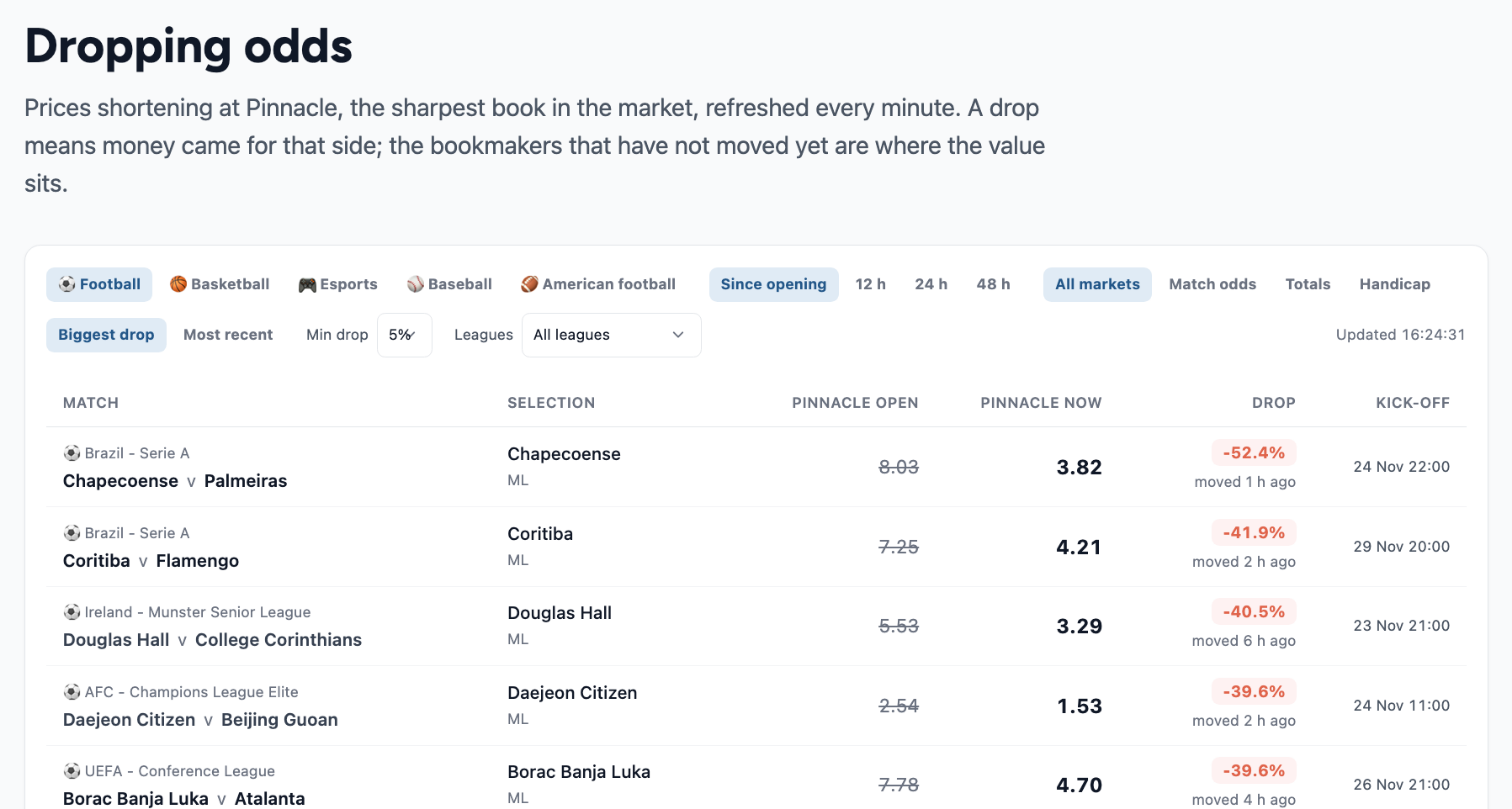
- While the page is open, the board asks for new prices once a minute.
- Updated at the right of the filter row is the time of the last answer.
- The same answer is reused for up to 30 seconds, so the prices can be about half a minute older than that time.
- moved 4 min ago on a row is the surest age: it is when Pinnacle's price itself last changed.
On a phone
On a narrow screen the table becomes a list. Each row has the league, the match, the selection and the market on the left.
On the right are Pinnacle's first price struck through, the current price and the drop. The bottom line reads Pinnacle, moved 4 min ago, with the kick-off.
The filter chips wrap onto several lines. Nothing scrolls sideways, and the alerts work the same.
When the board shows nothing or looks wrong
- No football prices dropped more than 5% in this window.
- Nothing matches. Lower Min drop, pick a longer window, or set Leagues to All leagues.
- Dropping odds are unavailable right now.
- The prices could not be fetched. The board tries again within a minute.
- Dropping odds are not available on the current data plan.
- A fault on our side. Tell us on the help page.
- Too many requests. Sign in for unlimited access.
- Only on the public page. Sign in and use Dropping odds in the hub.
- Match View opens on other prices
- Match View shows match odds only. Any line other than ML is in the Oddsmatcher.
- No alert arrives
- Check that Telegram alerts is on under My alerts (or Dropping odds alerts, with a separate bot), and that the alert is not paused. Only moves after you saved it count, and the hourly budget may be spent.
Something on the board does not match this guide? Tell us on the help page.